> ## Documentation Index
> Fetch the complete documentation index at: https://help.getvero.com/llms.txt
> Use this file to discover all available pages before exploring further.
# Liquid Discard
When segment conditions or workflow filters can not accomplish a specific use case, the `discard` tag allows you to use Liquid's powerful conditional logic to make the decision not to send an email based on the state of various user and/or event properties.
### Usage
A simple use case:
```liquid theme={null}
{% if user.first_name != "Steve" %}
{% discard 'This is not Steve' %}
{% endif %}
```
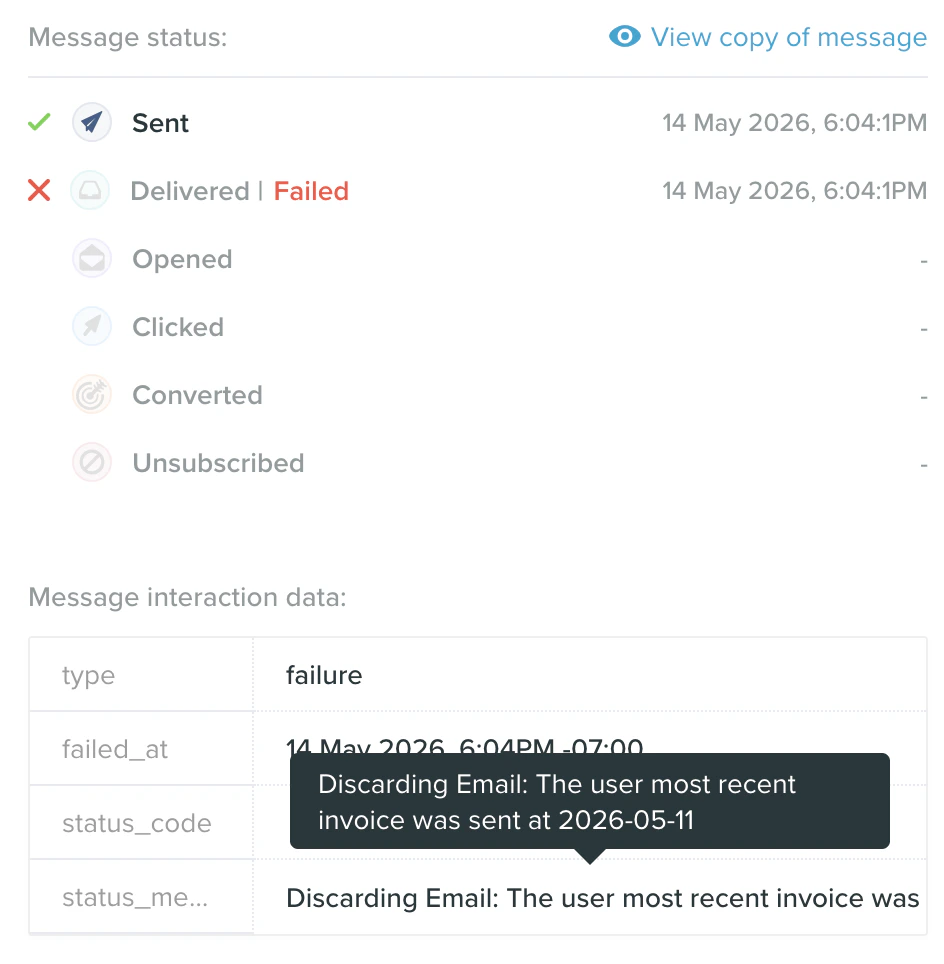
We check the value of `user.first_name` and if it does not match the name we are looking for, we call `discard` . We pass the `discard` tag a reason, in this case, `This is not Steve`. This reason will be recorded when the email gets discarded, and will show up in the logs as the Status Message on the Failure record.
**NOTE: A simple property comparison like this is already possible using filters and segment conditions, and it will always be preferable and more efficient to use one of those options when possible.**
What are some advanced use cases where Liquid's conditional logic can do what it is not possible to do with filters or conditions today?
* Advanced, dynamic date comparisons
* Digging into deeply nested data structures
* Comparisons that occur after using Liquid's powerful String or Array manipulation filters like `replace`, `map` and etc.
#### Advanced example
```liquid theme={null}
{% assign my_array_of_animals = "zebra, octopus, giraffe, aardvark" | split: ", " %}
{% assign first_animal_by_alphabetical = my_array_of_animals | sort | first %}
{% unless first_animal_by_alphabetical == 'ant' %}
{% discard 'The first animal was {{first_animal_by_alphabetical}} not "ant".' %}
{% endunless %}
```
We first create an array (list) from our string of animal names and then sort it alphabetically, pulling off the first item in the list after being sorted. Next we check, and unless that first animal is an 'ant', we discard the email.
#### Dynamic date comparisons
A real world example, you have a user property `most_recent_invoice_sent_at` which is a date, formatted in iso8601 format, and you want to discard the email if the most recent invoice was sent within the last 7 days. We can accomplish this using the `date_modify`[ filter](/vero-1/newsletters/list-of-liquid-functions-dynamic-templating-variables#date_modify).
```liquid theme={null}
{% assign today = extra.time.now | date: "%Y-%m-%d" %}
{% assign seven_days_ago = today | date_modify: '-7 days' %}
{% assign invoice_sent = user.most_recent_invoice_sent_at | date: "%Y-%m-%d" %}
{% if invoice_sent >= seven_days_ago %}
{% discard 'The user most recent invoice was sent at {{user.most_recent_invoice_sent_at}}' %}
{% endif %}
```
First we assign today's date, using the `extra.time.now` function, and format it to a standardized date format. Then we use `date_modify` to find the date 7 days prior and assign that to a variable, `seven_days_ago`. Next we assign a similarly formatted version of `user.most_recent_invoice_sent` to `invoice_sent` .
Now we compare the two dates. Remember that in computing, more recent dates are always larger than older ones.
Finally, we call `discard` for any invoice sent within the last seven days.
### Logs
The discard will appear in the logs as a failure, with the discard reason recorded in the status message.