> ## Documentation Index
> Fetch the complete documentation index at: https://help.getvero.com/llms.txt
> Use this file to discover all available pages before exploring further.
# DNS Records (SPF, DKIM, DMARC, A, and PTR)
> Understand how SPF, DKIM, DMARC, A, and PTR records work together to authenticate your email sending.
Related: [How to setup a custom sending domain](/vero-1/settings/how-to-setup-a-custom-sending-domain "How to setup a custom sending domain")
SPF, DKIM and DMARC work together to protect your email reputation and to protect your users from phishing attempts.
If you send a marketing email in Vero from `john@yourdomain.com`, SPF, DKIM and DMARC are the methods by which Gmail, Outlook and other email providers confirm you’re **allowed** to send from `yourdomain.com`.
## How Vero configures SPF and DKIM
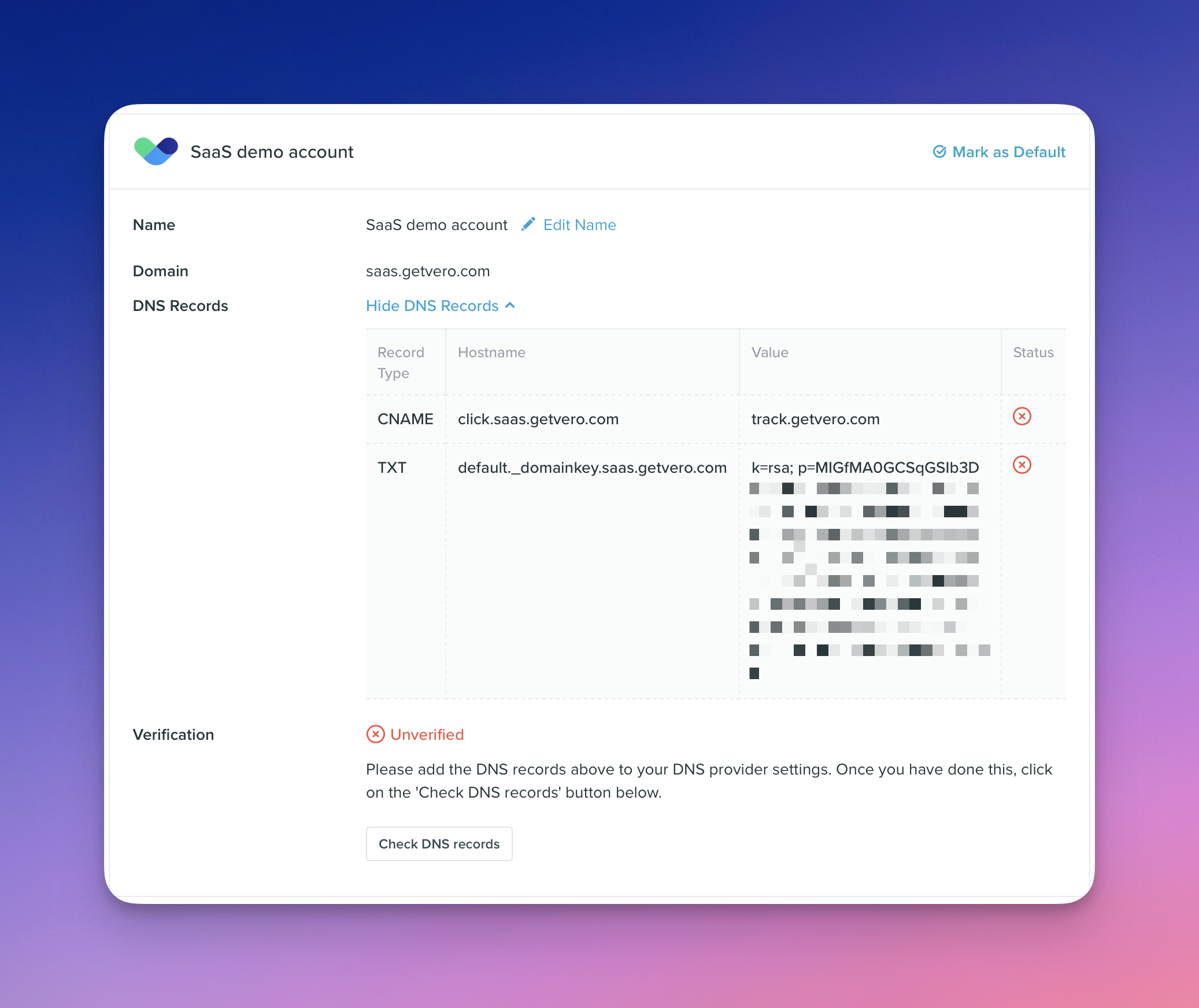
When you add a custom domain to Vero you will see two DNS records. Take the screenshot below.
 ### DKIM verification
When you add the `TXT` record for `default._domainkey.saas.getvero.com`, you’re proving that you own the domain in question. In this case we’re proving we own `saas.getvero.com`.
Here’s the process in practice:
* Vero generates a **private key** (kept securely on our side) and a corresponding **public key.** The public key is published as the `p=` part of the `default._domainkey.saas.getvero.com` DNS value.
* When Vero sends an email, we attach a DKIM-Signature header:
* `d=` is set to the sending domain (`saas.getvero.com`).
* `s=` points to the DNS selector (`default`). This is how Gmail, etc. know to find `default._domainkey.saas.getvero.com`.
* `b=` contains a signature. This is a hash we generate and then **encrypt** using the secret *private* key.
* The receiving mail server:
1. Recalculates the hash of the email headers/body.
2. Fetches the public key from `default._domainkey.saas.getvero.com`.
3. Uses the public key in the DNS record to **decrypt** the value in `b=`. It compares this with the recalculated hash (mentioned in #1 above).
* If the hashes match then DKIM succeeeds, i.e. `DKIM = pass`.
This ensures the email truly came from a server authorized to send for your domain and that it hasn’t been tampered with before it arrived in your inbox.
### SPF verification
SPF works slightly differently:
* Your domain’s SPF record declares which mail servers are allowed to send on your behalf.
* When Vero sends an email, the `Return-Path` is set to a Vero-controlled email and domain. In our example above this will be something like `HASH@track.getvero.com`.
* Recipient servers, like Gmail, will use the `Return-Path` to look up the domain [`track.getvero.com`](http://track.getvero.com) and relevant SPF records.
* The receiving server checks the sending IP against that `Return-Path` domain’s SPF record.
* SPF records can be “chained”. You’ll notice [`track.getvero.com`](http://track.getvero.com) delegates SPF records to various domains and IPs.
## DMARC checks and reporting
**SPF checks** : Does the `Return-Path` domain authorize the sending IP?
**DKIM checks** : Does the email carry a valid signature? Was it sent by a server who has access to the secure private key.
**DMARC** ties SPF and DKIM together. It checks for **alignment** : do either SPF or DKIM “line up” with the visible `From` address? It asks: *“Take the results of SPF and DKIM, and make sure that at least one passes**and** matches the visible `From` domain.”*
Let’s say we’d sent an email from [`info@saas.getvero.com`](mailto:info@saas.getvero.com), DMARC checks that at least one of SPF or DKIM passed and **also** that the from address `info@saas.getvero.com` actually matches the SPF or DKIM values.
You might ask why this is important? The reason is:
* SPF checks use domain in the `Return-Path` value.
* DKIM checks use the domain specified **in the DKIM header**.
If you do not have DMARC setup then anyone on earth could setup Sendgrid, Mailgun, Vero, etc. and have valid SPF and DKIM checks…but then send with a from address like `info@yourdomain.com`. For clarity, imagine this email:
```
From: ceo@yourdomain.com
Return-Path: bounce@mailer-service.com
DKIM: d=mailer-service.com (valid signature)
```
In this example, SPF and DKIM could both pass for `mailer-service.com`. They’d be valid.
And, yet, neither of those match `ceo@yourdomain.com`.
That’s what DMARC solves. It checks that either the domain in `Return-Path` or the `d=` DKIM header **align with** `ceo@yourdomain.com`.
After checking, DMARC then enforces your policy:
* `p=none` → just monitor.
* `p=quarantine` → send suspicious mail to spam.
* `p=reject` → reject suspicious mail outright.
DMARC also enables **reporting**. Providers send you daily/weekly/monthly reports showing who is sending on behalf of your domain, whether they pass/align, and whether spoof attempts are being blocked. These reports help you monitor your domain’s email health and catch any misconfigurations.
## Bringing it all together
* **SPF** checks the envelope sender (`Return-Path`).
* **DKIM** checks a cryptographic signature against your DNS.
* **DMARC** ensures at least one of SPF or DKIM both passes and matches your From domain, and lets you choose what to do if they don’t.
When configured correctly in Vero, these three work together to protect your brand and ensure your emails reach the inbox.
## What email headers look like
Using Gmail’s “View Original”, here’s a snippet of some headers from a real email sent by Vero. This email is one of our own emails (we use Vero of course).
### DKIM verification
When you add the `TXT` record for `default._domainkey.saas.getvero.com`, you’re proving that you own the domain in question. In this case we’re proving we own `saas.getvero.com`.
Here’s the process in practice:
* Vero generates a **private key** (kept securely on our side) and a corresponding **public key.** The public key is published as the `p=` part of the `default._domainkey.saas.getvero.com` DNS value.
* When Vero sends an email, we attach a DKIM-Signature header:
* `d=` is set to the sending domain (`saas.getvero.com`).
* `s=` points to the DNS selector (`default`). This is how Gmail, etc. know to find `default._domainkey.saas.getvero.com`.
* `b=` contains a signature. This is a hash we generate and then **encrypt** using the secret *private* key.
* The receiving mail server:
1. Recalculates the hash of the email headers/body.
2. Fetches the public key from `default._domainkey.saas.getvero.com`.
3. Uses the public key in the DNS record to **decrypt** the value in `b=`. It compares this with the recalculated hash (mentioned in #1 above).
* If the hashes match then DKIM succeeeds, i.e. `DKIM = pass`.
This ensures the email truly came from a server authorized to send for your domain and that it hasn’t been tampered with before it arrived in your inbox.
### SPF verification
SPF works slightly differently:
* Your domain’s SPF record declares which mail servers are allowed to send on your behalf.
* When Vero sends an email, the `Return-Path` is set to a Vero-controlled email and domain. In our example above this will be something like `HASH@track.getvero.com`.
* Recipient servers, like Gmail, will use the `Return-Path` to look up the domain [`track.getvero.com`](http://track.getvero.com) and relevant SPF records.
* The receiving server checks the sending IP against that `Return-Path` domain’s SPF record.
* SPF records can be “chained”. You’ll notice [`track.getvero.com`](http://track.getvero.com) delegates SPF records to various domains and IPs.
## DMARC checks and reporting
**SPF checks** : Does the `Return-Path` domain authorize the sending IP?
**DKIM checks** : Does the email carry a valid signature? Was it sent by a server who has access to the secure private key.
**DMARC** ties SPF and DKIM together. It checks for **alignment** : do either SPF or DKIM “line up” with the visible `From` address? It asks: *“Take the results of SPF and DKIM, and make sure that at least one passes**and** matches the visible `From` domain.”*
Let’s say we’d sent an email from [`info@saas.getvero.com`](mailto:info@saas.getvero.com), DMARC checks that at least one of SPF or DKIM passed and **also** that the from address `info@saas.getvero.com` actually matches the SPF or DKIM values.
You might ask why this is important? The reason is:
* SPF checks use domain in the `Return-Path` value.
* DKIM checks use the domain specified **in the DKIM header**.
If you do not have DMARC setup then anyone on earth could setup Sendgrid, Mailgun, Vero, etc. and have valid SPF and DKIM checks…but then send with a from address like `info@yourdomain.com`. For clarity, imagine this email:
```
From: ceo@yourdomain.com
Return-Path: bounce@mailer-service.com
DKIM: d=mailer-service.com (valid signature)
```
In this example, SPF and DKIM could both pass for `mailer-service.com`. They’d be valid.
And, yet, neither of those match `ceo@yourdomain.com`.
That’s what DMARC solves. It checks that either the domain in `Return-Path` or the `d=` DKIM header **align with** `ceo@yourdomain.com`.
After checking, DMARC then enforces your policy:
* `p=none` → just monitor.
* `p=quarantine` → send suspicious mail to spam.
* `p=reject` → reject suspicious mail outright.
DMARC also enables **reporting**. Providers send you daily/weekly/monthly reports showing who is sending on behalf of your domain, whether they pass/align, and whether spoof attempts are being blocked. These reports help you monitor your domain’s email health and catch any misconfigurations.
## Bringing it all together
* **SPF** checks the envelope sender (`Return-Path`).
* **DKIM** checks a cryptographic signature against your DNS.
* **DMARC** ensures at least one of SPF or DKIM both passes and matches your From domain, and lets you choose what to do if they don’t.
When configured correctly in Vero, these three work together to protect your brand and ensure your emails reach the inbox.
## What email headers look like
Using Gmail’s “View Original”, here’s a snippet of some headers from a real email sent by Vero. This email is one of our own emails (we use Vero of course).
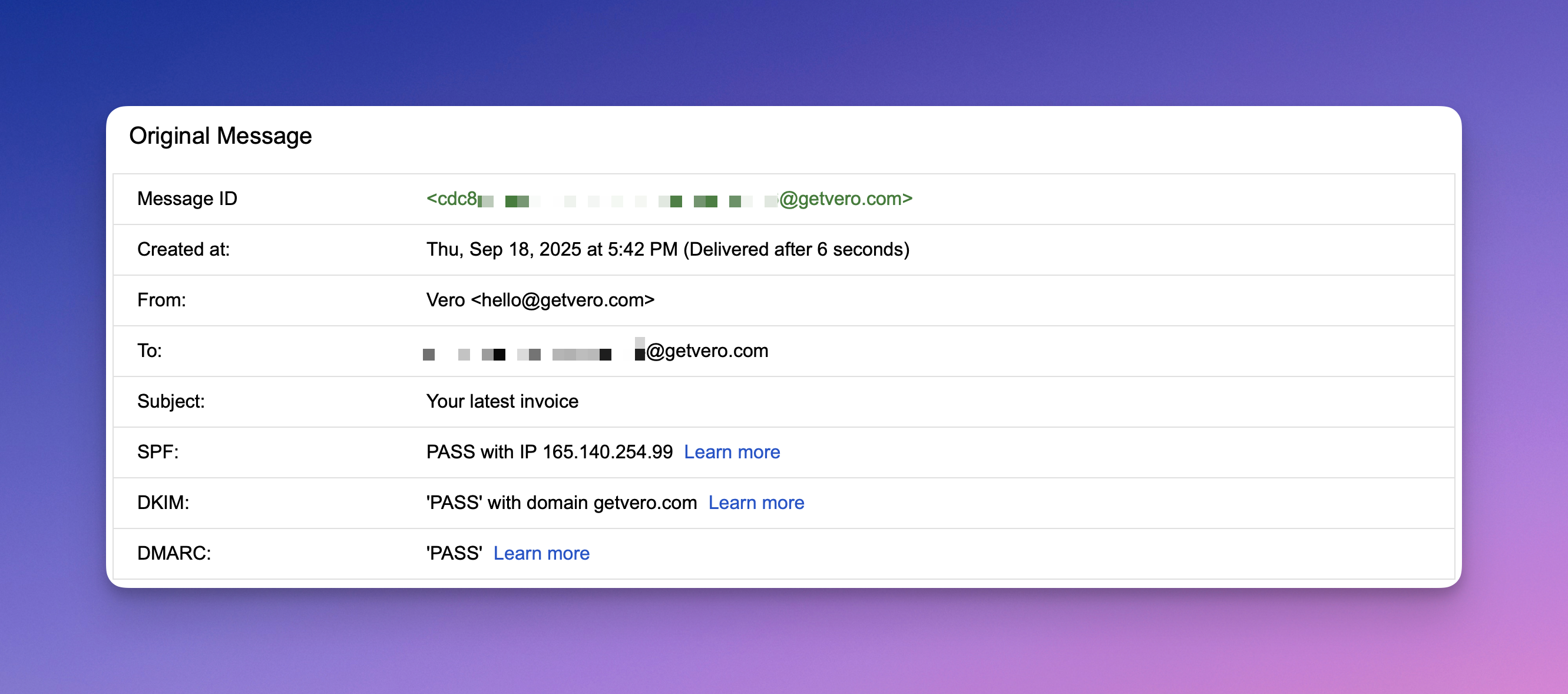 A copy of the headers, sensitive aspects removed:
```
Delivered-To: REDACTED@getvero.com
Received: Thu, 18 Sep 2025 00:43:02 -0700 (PDT)
Return-Path:
Received: from REDACTED.greenarrowmail.com (REDACTED.greenarrowmail.com. [165.140.254.99])
by mx.google.com with ESMTPS id REDACTED
for
Thu, 18 Sep 2025 00:43:01 -0700 (PDT)
Received-SPF: pass (google.com: domain of return-REDACTED@click.getvero.com designates 165.140.254.99 as permitted sender) client-ip=165.140.254.99;
Authentication-Results: mx.google.com;
dkim=pass header.i=@getvero.com header.s=default header.b=REDACTED;
spf=pass (google.com: domain of return-REDACTED@click.getvero.com designates 165.140.254.99 as permitted sender)
dmarc=pass (p=REJECT sp=NONE dis=NONE) header.from=getvero.com
Reply-To: hello@getvero.com
```
Here’s what this all means.
| Header | Meaning |
| ------------------------------------- | --------------------------------------------------------------------------------------------------------------------------------------------------------------------------------------- |
| `Delivered-To` | Who the email was sent to. If you’re receiving the email, this is likely to be your email address. |
| `Return-Path` | This is kind of like a hidden from address. It’s the envelope sender. Vero sets it to a Vero-controlled domain, e.g. `click.getvero.com`. This email and domain is used for SPF checks. |
| `Received-SPF` | Shows whether the sending server’s IP was authorized by the SPF record of the `Return-Path` domain. |
| `Authentication-Results` `spf=pass` | Another header confirming SPF passed. The sending IP matched the SPF record for the Return-Path domain. |
| `Authentication-Results` `dkim=pass` | Confirms DKIM passed. The message was signed with a DKIM signature for [`getvero.com`](http://getvero.com/) and the signature validated. |
| `Authentication-Results` `dmarc=pass` | Confirms DMARC passed. At least one of SPF **or** DKIM passed **and** aligned with the visible `From` address\*\*.\*\* |
## A and PTR records (less common)
Most customers will never need to configure **A** or **PTR** records — Vero manages these by default.
However, in some cases we may ask you to create them when you’re sending from your **own branded domain** using **Vero’s infrastructure**.
Here’s what they are and why they matter:
### What an A record does
An **A (Address)** record maps your sending hostname (like `mail.yourdomain.com`) to a specific IP address — in this case, one of Vero’s sending IPs.
It ensures that when mail providers look up your domain, it resolves to the same IP address used to send messages.
Example:
```
mail.yourdomain.com → 198.51.100.12
```
***
### What a PTR record does
A **PTR (Pointer)** record does the reverse — it maps an IP address back to a domain name.
This is known as **reverse DNS** (rDNS).
Example:
```
198.51.100.12 → mail.yourdomain.com
```
When both records point to each other, it’s called **forward-confirmed reverse DNS (FCrDNS)**.
This is a strong trust signal for mail providers like Gmail and Outlook.
***
### Why Vero sometimes asks you to set these up
Even though your emails are being sent from Vero’s infrastructure, we may ask you to add **A/PTR records** to make the sending IP and domain appear as if they belong to your own brand.
This is useful when:
* You’re sending from a **custom subdomain** (like `mail.yourdomain.com`).
* You are paying for dedicated IP's.
* You want the sending IP’s reverse DNS (PTR) to match your domain.
* You’re establishing **dedicated sending reputation** for your domain.
For example, if your Vero sending IP is `198.51.100.12`, we may ask you to create:
* An **A record** : `mail.yourdomain.com → 198.51.100.12`
* A **PTR record** : `198.51.100.12 → mail.yourdomain.com`
This helps ensure:
* Mail servers see consistent, aligned DNS data (A ↔ PTR match).
* Your “From” domain, DKIM, and envelope sender align with network identity.
* You build a strong domain reputation that reflects your brand, not Vero’s shared infrastructure.
***
### Summary
| Record | Direction | Purpose | Managed by |
| -------------- | ----------- | -------------------------------------------------- | -------------------- |
| **A record** | Domain → IP | Forward lookup; shows where your mail server lives | Usually you |
| **PTR record** | IP → Domain | Reverse lookup; confirms mail server identity | Usually Vero |
| **SPF** | TXT record | Lists authorized mail servers | You (guided by Vero) |
| **DKIM** | TXT record | Publishes public key for signatures | You (guided by Vero) |
| **DMARC** | TXT record | Defines handling/reporting policy | You |
> ✅ In short: A and PTR records help make your sending domain and IP appear as one — strengthening your reputation and improving deliverability.
***
A copy of the headers, sensitive aspects removed:
```
Delivered-To: REDACTED@getvero.com
Received: Thu, 18 Sep 2025 00:43:02 -0700 (PDT)
Return-Path:
Received: from REDACTED.greenarrowmail.com (REDACTED.greenarrowmail.com. [165.140.254.99])
by mx.google.com with ESMTPS id REDACTED
for
Thu, 18 Sep 2025 00:43:01 -0700 (PDT)
Received-SPF: pass (google.com: domain of return-REDACTED@click.getvero.com designates 165.140.254.99 as permitted sender) client-ip=165.140.254.99;
Authentication-Results: mx.google.com;
dkim=pass header.i=@getvero.com header.s=default header.b=REDACTED;
spf=pass (google.com: domain of return-REDACTED@click.getvero.com designates 165.140.254.99 as permitted sender)
dmarc=pass (p=REJECT sp=NONE dis=NONE) header.from=getvero.com
Reply-To: hello@getvero.com
```
Here’s what this all means.
| Header | Meaning |
| ------------------------------------- | --------------------------------------------------------------------------------------------------------------------------------------------------------------------------------------- |
| `Delivered-To` | Who the email was sent to. If you’re receiving the email, this is likely to be your email address. |
| `Return-Path` | This is kind of like a hidden from address. It’s the envelope sender. Vero sets it to a Vero-controlled domain, e.g. `click.getvero.com`. This email and domain is used for SPF checks. |
| `Received-SPF` | Shows whether the sending server’s IP was authorized by the SPF record of the `Return-Path` domain. |
| `Authentication-Results` `spf=pass` | Another header confirming SPF passed. The sending IP matched the SPF record for the Return-Path domain. |
| `Authentication-Results` `dkim=pass` | Confirms DKIM passed. The message was signed with a DKIM signature for [`getvero.com`](http://getvero.com/) and the signature validated. |
| `Authentication-Results` `dmarc=pass` | Confirms DMARC passed. At least one of SPF **or** DKIM passed **and** aligned with the visible `From` address\*\*.\*\* |
## A and PTR records (less common)
Most customers will never need to configure **A** or **PTR** records — Vero manages these by default.
However, in some cases we may ask you to create them when you’re sending from your **own branded domain** using **Vero’s infrastructure**.
Here’s what they are and why they matter:
### What an A record does
An **A (Address)** record maps your sending hostname (like `mail.yourdomain.com`) to a specific IP address — in this case, one of Vero’s sending IPs.
It ensures that when mail providers look up your domain, it resolves to the same IP address used to send messages.
Example:
```
mail.yourdomain.com → 198.51.100.12
```
***
### What a PTR record does
A **PTR (Pointer)** record does the reverse — it maps an IP address back to a domain name.
This is known as **reverse DNS** (rDNS).
Example:
```
198.51.100.12 → mail.yourdomain.com
```
When both records point to each other, it’s called **forward-confirmed reverse DNS (FCrDNS)**.
This is a strong trust signal for mail providers like Gmail and Outlook.
***
### Why Vero sometimes asks you to set these up
Even though your emails are being sent from Vero’s infrastructure, we may ask you to add **A/PTR records** to make the sending IP and domain appear as if they belong to your own brand.
This is useful when:
* You’re sending from a **custom subdomain** (like `mail.yourdomain.com`).
* You are paying for dedicated IP's.
* You want the sending IP’s reverse DNS (PTR) to match your domain.
* You’re establishing **dedicated sending reputation** for your domain.
For example, if your Vero sending IP is `198.51.100.12`, we may ask you to create:
* An **A record** : `mail.yourdomain.com → 198.51.100.12`
* A **PTR record** : `198.51.100.12 → mail.yourdomain.com`
This helps ensure:
* Mail servers see consistent, aligned DNS data (A ↔ PTR match).
* Your “From” domain, DKIM, and envelope sender align with network identity.
* You build a strong domain reputation that reflects your brand, not Vero’s shared infrastructure.
***
### Summary
| Record | Direction | Purpose | Managed by |
| -------------- | ----------- | -------------------------------------------------- | -------------------- |
| **A record** | Domain → IP | Forward lookup; shows where your mail server lives | Usually you |
| **PTR record** | IP → Domain | Reverse lookup; confirms mail server identity | Usually Vero |
| **SPF** | TXT record | Lists authorized mail servers | You (guided by Vero) |
| **DKIM** | TXT record | Publishes public key for signatures | You (guided by Vero) |
| **DMARC** | TXT record | Defines handling/reporting policy | You |
> ✅ In short: A and PTR records help make your sending domain and IP appear as one — strengthening your reputation and improving deliverability.
***