> ## Documentation Index
> Fetch the complete documentation index at: https://help.getvero.com/llms.txt
> Use this file to discover all available pages before exploring further.
# True/False node
> Add conditional logic to a Journey to route users down different paths based on their behaviour and properties.
A True/False node evaluates conditions when a user reaches that point in a Journey and routes them down one of two paths — **True** or **False** — depending on whether they meet the conditions you define. This lets you tailor the rest of the Journey to each user's behaviour, properties, and history.
In Vero 1.0 Workflows, similar conditional routing was handled by a Filter node. In Vero 2.0, the same filtering behaviour is achieved by combining a True/False node with an [Exit node](https://help.getvero.com/vero-2/campaigns/journeys/exit-node) on the false path.
## Adding a True/False node
1. Open your Journey and click **Edit Journey** to access the canvas.
2. Click the **+** button at the point in your Journey where you want to add branching logic.
3. Select **True/False** from the node menu.
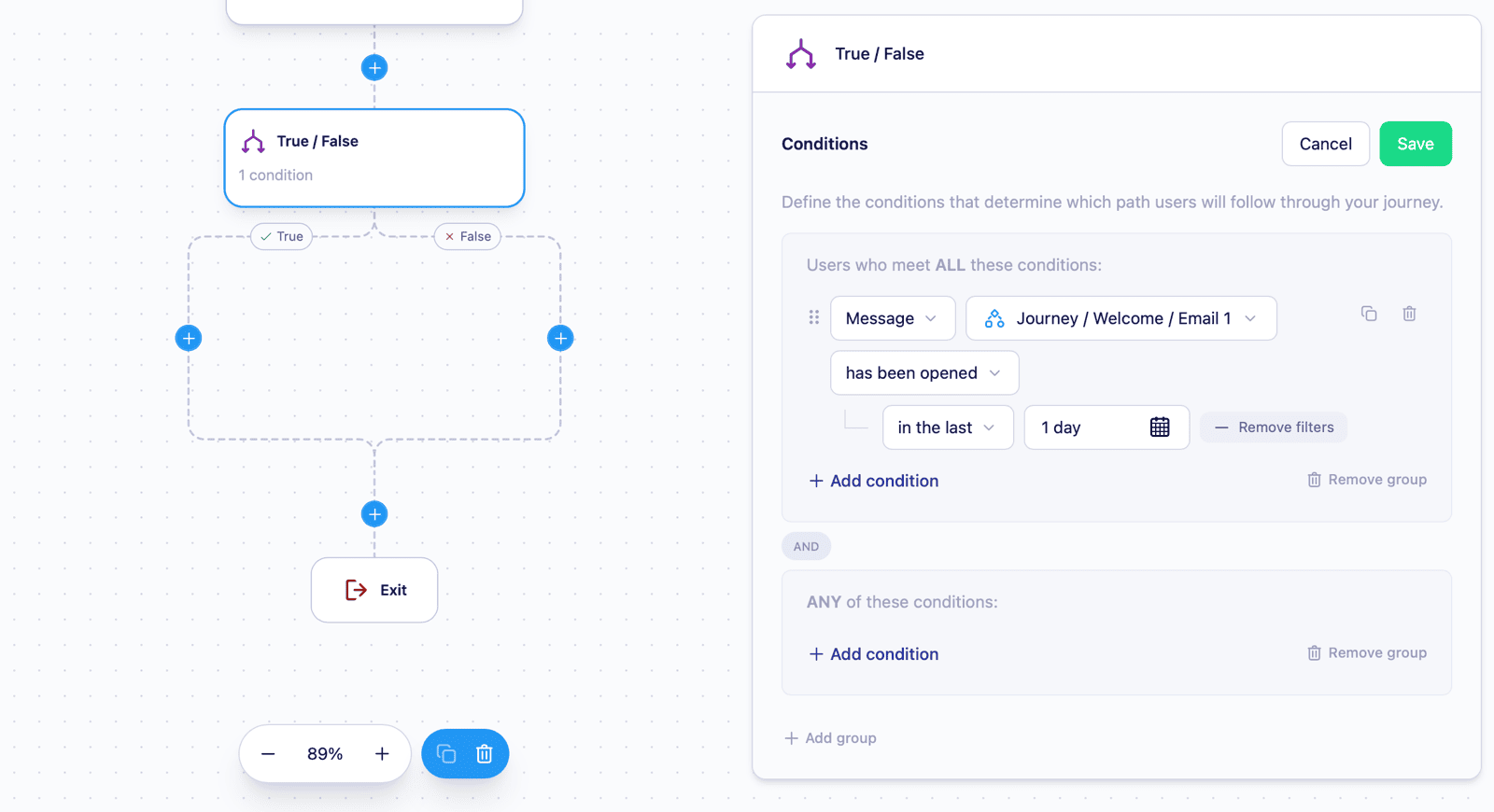 The True/False node is added with two paths — **True** and **False** — automatically joined at a convergence point below. You can add nodes to either path independently.
## Configuring conditions
1. Click the True/False node on the canvas to select it.
2. Click **Edit** in the side panel to open the condition builder.
3. Add one or more conditions to define which users take the **True** path.
4. Click **Save** to apply your conditions.
The node displays a summary of your saved conditions (e.g. "2 conditions") so you can review the logic at a glance without opening the editor.
### Available condition types
True/False nodes support the same condition types as Segments — user properties, events, tags, segment membership, and message interactions. See [Segment conditions](https://help.getvero.com/vero-2/segments/segment-conditions) for a full reference of available operators and options.
True/False nodes also support two conditions unique to Journeys:
| Condition | Description |
| ------------------------------------------------------- | ---------------------------------------------------------------------------------------------------------------------------------------------------------------------------------------------------------------- |
| **Trigger event property** | Routes users based on a property of the event that triggered the user's entry into this Journey. Works like a user property condition, but evaluates the triggering event's data rather than the user's profile. |
| **Has not performed event since entering this Journey** | Routes users based on whether the user has performed a specific event since they entered this Journey. Select the event, then choose "since user entered this Journey" as the timeframe. |
## Nesting True/False nodes
You can add a Branch node inside an existing branch path to build more complex conditional logic. Each nested branch is independently configurable with its own conditions and true/false paths.
## Removing a True/False node
To remove a True/False node, click it on the canvas to reveal the inline menu below the node, then click the **Delete** (trash) icon. Removing a True/False node also removes all nodes within its branches, so move any nodes you want to keep before deleting.
## Limitations
* True/False nodes evaluate conditions in real time when a user reaches that point in the Journey.
* Journeys must be stopped before you can add, edit, or remove True/False nodes.
* Changes to a True/False node's conditions take effect for any users who subsequently reach that node.
## Next steps
* [Exit node](https://help.getvero.com/vero-2/campaigns/journeys/exit-node) — remove users from a Journey at a specific point, useful for filtering users on the false path of a True/False node
* [Creating and editing a Journey](https://help.getvero.com/vero-2/campaigns/journeys/creating-and-editing-journeys) — learn how to build and launch a Journey
* [Segment conditions](https://help.getvero.com/vero-2/segments/segment-conditions) — full reference for condition types and operators available in True/False node conditions
## Need Help?
If you have any questions, reach out to us at [support@getvero.com](mailto:support@getvero.com).
The True/False node is added with two paths — **True** and **False** — automatically joined at a convergence point below. You can add nodes to either path independently.
## Configuring conditions
1. Click the True/False node on the canvas to select it.
2. Click **Edit** in the side panel to open the condition builder.
3. Add one or more conditions to define which users take the **True** path.
4. Click **Save** to apply your conditions.
The node displays a summary of your saved conditions (e.g. "2 conditions") so you can review the logic at a glance without opening the editor.
### Available condition types
True/False nodes support the same condition types as Segments — user properties, events, tags, segment membership, and message interactions. See [Segment conditions](https://help.getvero.com/vero-2/segments/segment-conditions) for a full reference of available operators and options.
True/False nodes also support two conditions unique to Journeys:
| Condition | Description |
| ------------------------------------------------------- | ---------------------------------------------------------------------------------------------------------------------------------------------------------------------------------------------------------------- |
| **Trigger event property** | Routes users based on a property of the event that triggered the user's entry into this Journey. Works like a user property condition, but evaluates the triggering event's data rather than the user's profile. |
| **Has not performed event since entering this Journey** | Routes users based on whether the user has performed a specific event since they entered this Journey. Select the event, then choose "since user entered this Journey" as the timeframe. |
## Nesting True/False nodes
You can add a Branch node inside an existing branch path to build more complex conditional logic. Each nested branch is independently configurable with its own conditions and true/false paths.
## Removing a True/False node
To remove a True/False node, click it on the canvas to reveal the inline menu below the node, then click the **Delete** (trash) icon. Removing a True/False node also removes all nodes within its branches, so move any nodes you want to keep before deleting.
## Limitations
* True/False nodes evaluate conditions in real time when a user reaches that point in the Journey.
* Journeys must be stopped before you can add, edit, or remove True/False nodes.
* Changes to a True/False node's conditions take effect for any users who subsequently reach that node.
## Next steps
* [Exit node](https://help.getvero.com/vero-2/campaigns/journeys/exit-node) — remove users from a Journey at a specific point, useful for filtering users on the false path of a True/False node
* [Creating and editing a Journey](https://help.getvero.com/vero-2/campaigns/journeys/creating-and-editing-journeys) — learn how to build and launch a Journey
* [Segment conditions](https://help.getvero.com/vero-2/segments/segment-conditions) — full reference for condition types and operators available in True/False node conditions
## Need Help?
If you have any questions, reach out to us at [support@getvero.com](mailto:support@getvero.com).