> ## Documentation Index
> Fetch the complete documentation index at: https://help.getvero.com/llms.txt
> Use this file to discover all available pages before exploring further.
# Custom email headers
> Add custom email headers including list-unsubscribe to improve deliverability and meet email client requirements.
Adding a custom header to your emails can be a useful tool for helping recipient email clients differentiate between a spam email and a genuine email and is a current requirement for larger email clients like Google and Yahoo.
They are also useful for allowing customers to unsubscribe from your emails rather than marking them as spam with their email client, in turn impacting your deliverability reputation.
## Adding a custom header to your campaign
If you'd like to set up a custom header across *all* campaigns, you can edit this in the [Advanced section of Settings](https://app.getvero.com/settings/advanced). *If you use this option, please note the extra instructions below.*
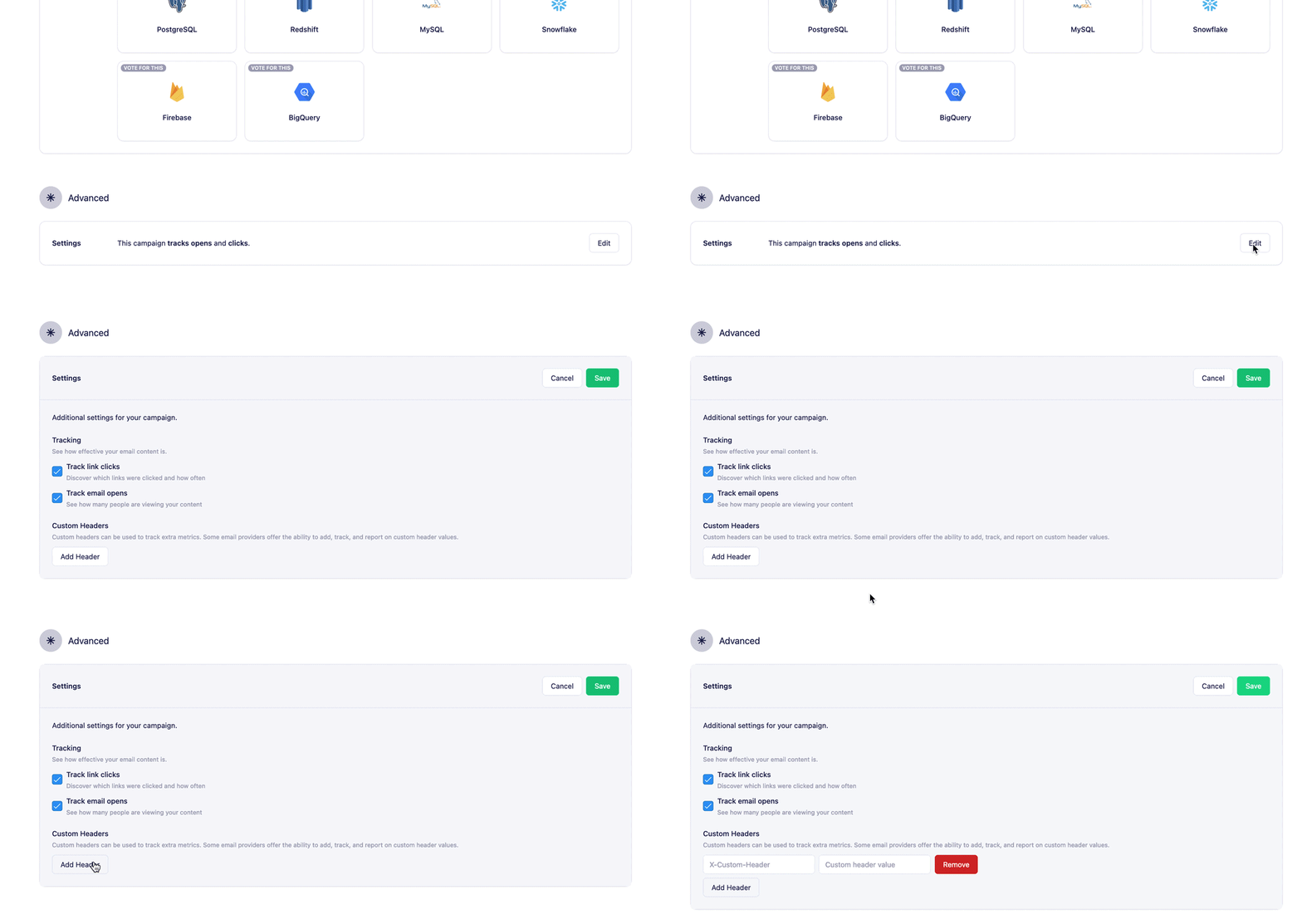
If you'd like to set up a custom header on a per campaign basis you can do this by visiting the **Advanced** section at the bottom of your campaign and clicking *Add header*.
 ### Adding a custom list-unsubscribe header
***By Default, Vero automatically adds the one-click list-unsubscribe option across all campaigns.***
### Adding a custom list-unsubscribe header
***By Default, Vero automatically adds the one-click list-unsubscribe option across all campaigns.***
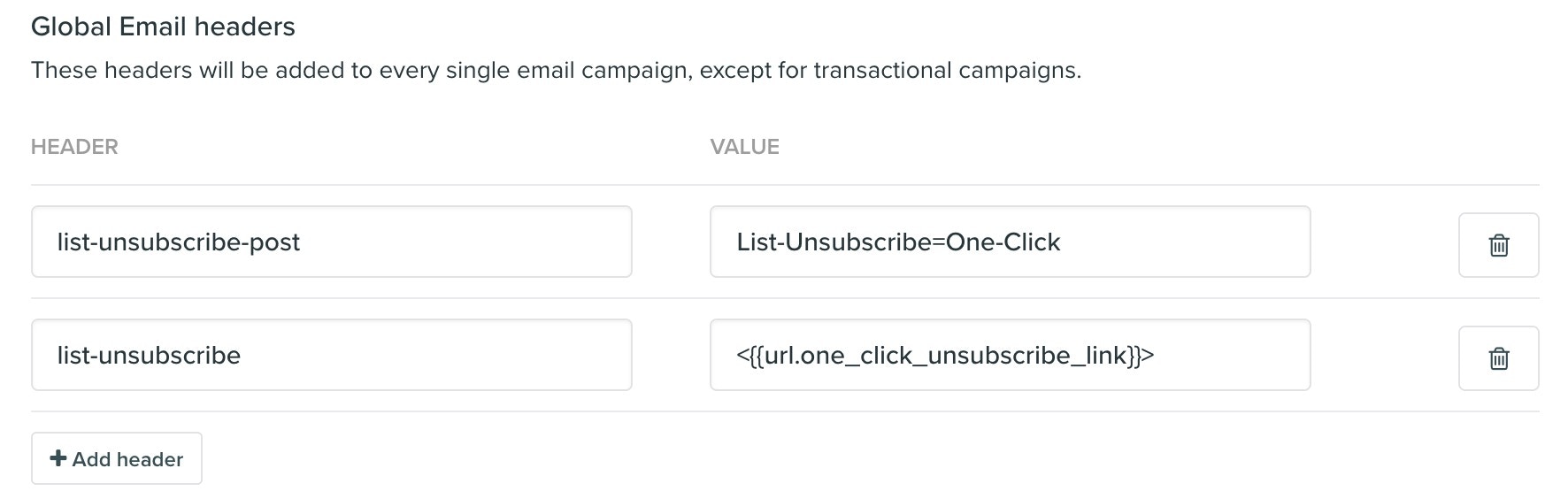 This can be added as a custom header in your Vero campaign by using `list-unsubscribe: ,<{{url.one_click_unsubscribe_link}}>`
 The `mailto:` address (ie. [unsubscribe@yourdomain.com](mailto:unsubscribe@yourdomain.com)) should be a valid email address that you control. It must be monitored, and emails sent to that address will need to be unsubscribed.
### Requirements for custom list-unsubscribe headers
*The following is for customers that want to add their own custom list-unsubscribe option rather than using the default option provided by Vero*.
1. **Using a One-Click URL:** The URL used in the `list-unsubscribe` header must be a one-click unsubscribe endpoint. This endpoint must be capable of accepting a POST request in the following format:
POST /unsubscribe/example HTTP/1.1 Host: solarmora.com Content-Type: application/x-www-form-urlencoded Content-Length: 26
List-Unsubscribe=One-Click
The endpoint should also include parameters that identify the user so they can be unsubscribed (e.g.`?user_id={{ user.id }}`).
2. **Adding the list-unsubscribe-post header:** If you use a `list-unsubscribe`header with a URL, you also need to include the `list-unsubscribe-post` header:
`list-unsubscribe-post: List-Unsubscribe=One-Click`
### Additional Resources
For more detailed information on setting up one-click unsubscribe headers, refer to the following resources:
* [Google Requirements for Unsubscribe Links](https://support.google.com/a/answer/81126?hl=en#subscriptions\&zippy=%2Crequirements-for-sending-or-more-messages-per-day)
* [RFC 2369: The Use of URLs as Email Headers](https://tools.ietf.org/html/rfc2369)
* [RFC 8058: One-Click Unsubscribe for Email](https://tools.ietf.org/html/rfc8058)
The `mailto:` address (ie. [unsubscribe@yourdomain.com](mailto:unsubscribe@yourdomain.com)) should be a valid email address that you control. It must be monitored, and emails sent to that address will need to be unsubscribed.
### Requirements for custom list-unsubscribe headers
*The following is for customers that want to add their own custom list-unsubscribe option rather than using the default option provided by Vero*.
1. **Using a One-Click URL:** The URL used in the `list-unsubscribe` header must be a one-click unsubscribe endpoint. This endpoint must be capable of accepting a POST request in the following format:
POST /unsubscribe/example HTTP/1.1 Host: solarmora.com Content-Type: application/x-www-form-urlencoded Content-Length: 26
List-Unsubscribe=One-Click
The endpoint should also include parameters that identify the user so they can be unsubscribed (e.g.`?user_id={{ user.id }}`).
2. **Adding the list-unsubscribe-post header:** If you use a `list-unsubscribe`header with a URL, you also need to include the `list-unsubscribe-post` header:
`list-unsubscribe-post: List-Unsubscribe=One-Click`
### Additional Resources
For more detailed information on setting up one-click unsubscribe headers, refer to the following resources:
* [Google Requirements for Unsubscribe Links](https://support.google.com/a/answer/81126?hl=en#subscriptions\&zippy=%2Crequirements-for-sending-or-more-messages-per-day)
* [RFC 2369: The Use of URLs as Email Headers](https://tools.ietf.org/html/rfc2369)
* [RFC 8058: One-Click Unsubscribe for Email](https://tools.ietf.org/html/rfc8058)