> ## Documentation Index
> Fetch the complete documentation index at: https://help.getvero.com/llms.txt
> Use this file to discover all available pages before exploring further.
# Setting up Webhooks
> Send real-time notifications about message events and user activity to external systems.
Webhooks allow you to send real-time notifications about user and message activity in Vero to external systems. This is useful for:
* Triggering workflows in tools like Zapier or Segment.
* Syncing events to your data warehouse for analysis.
* Keeping your systems up to date with Vero activity.
This guide walks you through configuring and testing webhooks in Vero 2.0.
## What are webhooks?
A webhook is a simple HTTP request that Vero sends to a URL you specify whenever certain events occur in your project (e.g. a message is sent or a user unsubscribes).
Each webhook includes a JSON payload with details about the event.
## Add or edit webhooks
To manage your webhooks:
1. Go to **Settings → Project → Reporting Webhooks**.
2. Click **Add webhook**. 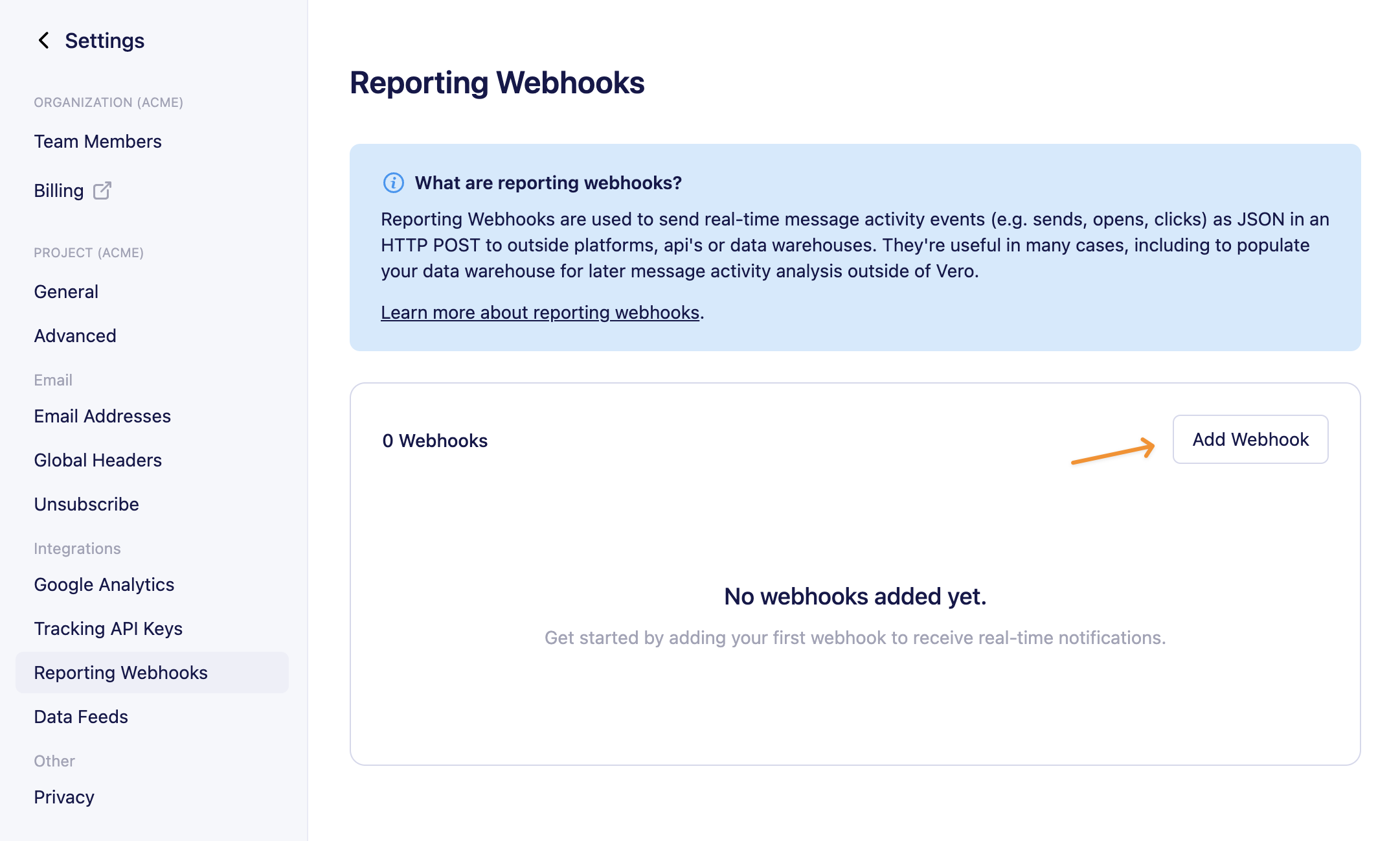 3. Enter the following details:
 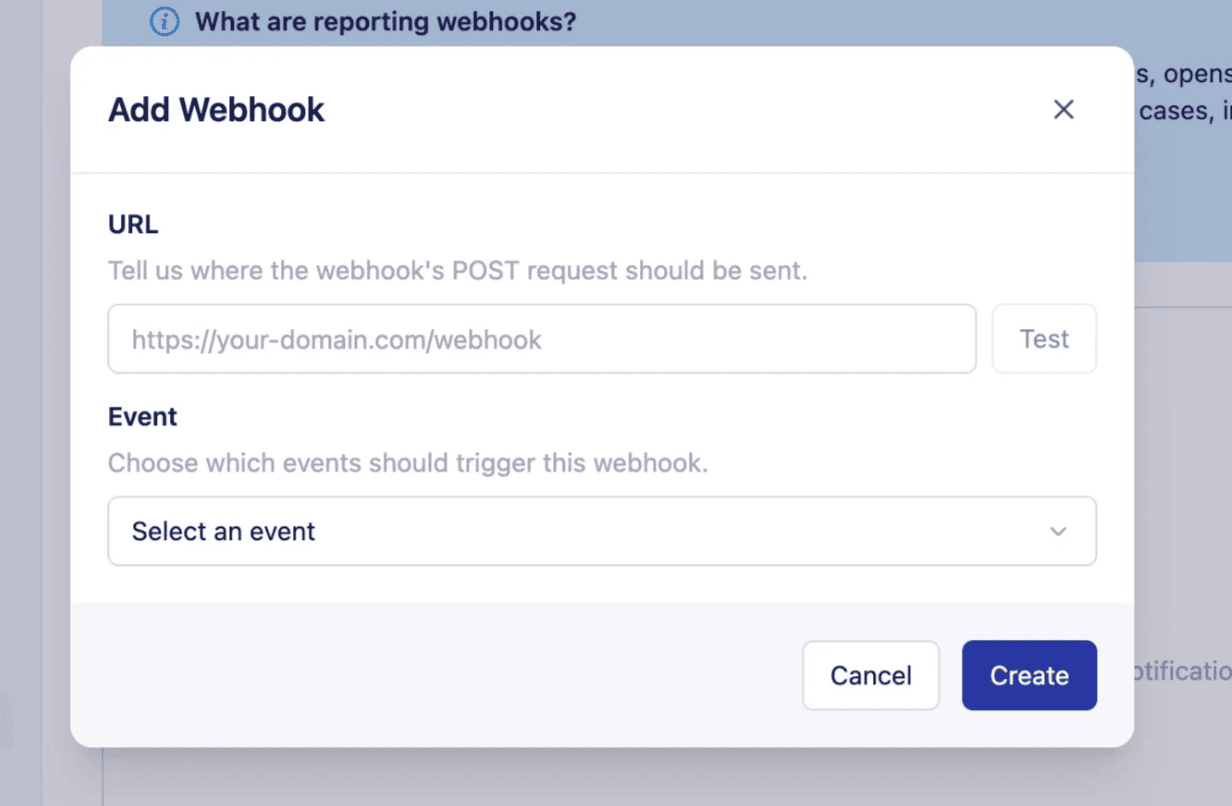 * **URL** – The endpoint in your system that should receive the webhook payload.
* **Event** – Choose which activity will send data to this URL:
* *Sent (email has been sent by Vero)*
* *Delivered (email has been delivered to the recipient email server)*
* *Opened*
* *Clicked*
* *Failed*
* *Bounced (hard and soft)*
* *Converted*
* *Unsubscribed*
* *Resubscribed*
* *Complained*
* *User created*
* *User updated*
4. Click **Save**. To edit an existing webhook, use the actions menu and select Edit.
## Test your webhooks
You can test a webhook to ensure your endpoint is set up correctly:
1. In the webhooks list, click the actions menu next to a webhook and choose **Test**.
* **URL** – The endpoint in your system that should receive the webhook payload.
* **Event** – Choose which activity will send data to this URL:
* *Sent (email has been sent by Vero)*
* *Delivered (email has been delivered to the recipient email server)*
* *Opened*
* *Clicked*
* *Failed*
* *Bounced (hard and soft)*
* *Converted*
* *Unsubscribed*
* *Resubscribed*
* *Complained*
* *User created*
* *User updated*
4. Click **Save**. To edit an existing webhook, use the actions menu and select Edit.
## Test your webhooks
You can test a webhook to ensure your endpoint is set up correctly:
1. In the webhooks list, click the actions menu next to a webhook and choose **Test**.
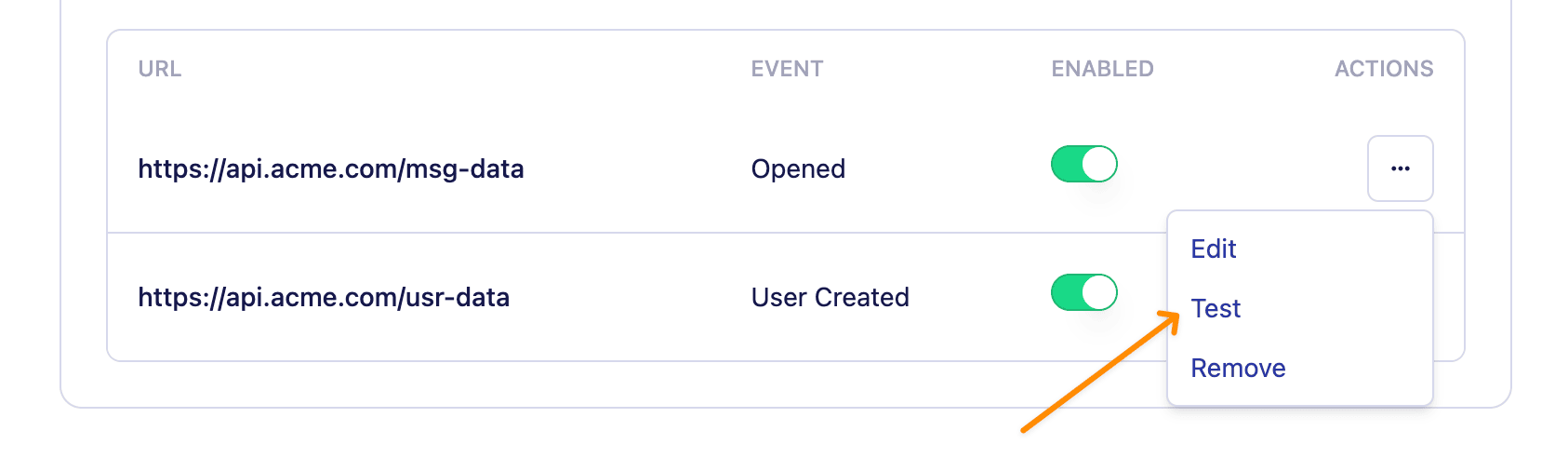 2. Vero will send a sample payload to your webhook URL.
3. You'll see a success or failure message in the app.
For testing, try using Request Bin - it's a fantastic way to see the webhooks Vero (or any service) sends.
## Enable or disable webhooks
Next to each webhook you'll find an **enable webhooks** toggle, with this you can enable/disable each webhook individually.
2. Vero will send a sample payload to your webhook URL.
3. You'll see a success or failure message in the app.
For testing, try using Request Bin - it's a fantastic way to see the webhooks Vero (or any service) sends.
## Enable or disable webhooks
Next to each webhook you'll find an **enable webhooks** toggle, with this you can enable/disable each webhook individually.
 ## Webhook payloads
Each webhook sends a JSON payload containing details about the event:
`sent` – When an email has been sent by Vero
```json theme={null}
{
"sent_at":1435016238,
"type":"sent",
"user": {
"id":123,
"email":"steve@getvero.com"
},
"campaign": {
"id":987,
"type":"transactional",
"name":"Order confirmation",
"group": "Order confirmation - Email 6",
"channel": "email",
"subject":"Your order is being processed!",
"trigger-event":"purchased item",
"permalink":"http://app.getvero.com/view/1/341d64944577ac1f70f560e37db54a25",
"sent_to":"user@example.com",
"variation":"Variation A",
"locale":"en-US"
},
"message_id": "20190730123456.1.1B72E094173067F0F@veromail.com"
}
```
`delivered` – When an email has been delivered to the ISP server:
```json theme={null}
{
"delivered_at":1435016238,
"type":"delivered",
"user": {
"id":123,
"email":"steve@getvero.com"
},
"campaign": {
"id":987,
"type":"transactional",
"name":"Order confirmation",
"group": "Order confirmation - Email 6",
"channel": "email",
"subject":"Your order is being processed!",
"trigger-event":"purchased item",
"permalink":"http://app.getvero.com/view/1/341d64944577ac1f70f560e37db54a25",
"sent_to":"user@example.com",
"variation":"Variation A",
"locale":"en-US"
},
"message_id": "20190730123456.1.1B72E094173067F0F@veromail.com"
}
```
`opened` – When a customer has opened an email
```json theme={null}
{
"opened_at":1435016238,
"user_agent":"Mozilla/5.0 (compatible; MSIE 9.0; Windows NT 6.1; Trident/5.0)",
"type":"opened",
"user": {
"id":123,
"email":"steve@getvero.com"
},
"campaign": {
"id":987,
"type":"transactional",
"name":"Order confirmation",
"group": "Order confirmation - Email 6",
"channel": "email",
"subject":"Your order is being processed!",
"trigger-event":"purchased item",
"permalink":"http://app.getvero.com/view/1/341d64944577ac1f70f560e37db54a25",
"sent_to":"user@example.com",
"variation":"Variation A",
"locale":"en-US"
},
"message_id": "20190730123456.1.1B72E094173067F0F@veromail.com"
}
```
`clicked` – When a customer has clicked an email
```json theme={null}
{
"clicked_at":1435016238,
"user_agent":"Mozilla/5.0 (compatible; MSIE 9.0; Windows NT 6.1; Trident/5.0)",
"type":"clicked",
"user": {
"id":123,
"email":"steve@getvero.com"
},
"campaign": {
"id":987,
"type":"transactional",
"name":"Order confirmation",
"group": "Order confirmation - Email 6",
"channel": "email",
"subject":"Your order is being processed!",
"trigger-event":"purchased item",
"permalink":"http://app.getvero.com/view/1/341d64944577ac1f70f560e37db54a25",
"sent_to":"user@example.com",
"variation":"Variation A",
"locale":"en-US"
},
"message_id": "20190730123456.1.1B72E094173067F0F@veromail.com"
}
```
`failed` - When an email could not send due to an error (such as a bad Fusion response)
```json theme={null}
{
"type":"failed",
"bounce_code":500,
"bounce_message": "FusionBadResponse",
"user": {
"id":123,
"email":"steve@getvero.com"
},
"campaign": {
"id":987,
"type":"transactional",
"name":"Order confirmation",
"group": "Order confirmation - Email 6",
"channel": "email",
"subject":"Your order is being processed!",
"trigger-event":"purchased item",
"permalink":"http://app.getvero.com/view/1/341d64944577ac1f70f560e37db54a25",
"sent_to":"user@example.com",
"variation":"Variation A",
"locale":"en-US"
}
}
```
`bounced` – When an email has not been delivered to the ISP server
```json theme={null}
{
"bounced_at":1435016238,
"bounce_type":"hard",
"bounce_code":550,
"bounce_message":"5.5.1 The email account that you tried to reach does not exist.",
"type":"bounced",
"user": {
"id":123,
"email":"steve@getvero.com"
},
"campaign": {
"id":987,
"type":"transactional",
"name":"Order confirmation",
"group": "Order confirmation - Email 6",
"channel": "email",
"subject":"Your order is being processed!",
"trigger-event":"purchased item",
"permalink":"http://app.getvero.com/view/1/341d64944577ac1f70f560e37db54a25",
"sent_to":"user@example.com",
"variation":"Variation A",
"locale":"en-US"
},
"message_id": "20190730123456.1.1B72E094173067F0F@veromail.com"
}
```
`converted` – When a customer has converted on an email campaign
```json theme={null}
{
"type":"converted",
"user": {
"id":123,
"email":"steve@getvero.com"
},
"campaign": {
"id":987,
"type":"transactional",
"name":"Order confirmation",
"group": "Order confirmation - Email 6",
"channel": "email",
"subject":"Your order is being processed!",
"trigger-event":"purchased item",
"permalink":"http://app.getvero.com/view/1/341d64944577ac1f70f560e37db54a25",
"sent_to":"user@example.com",
"variation":"Variation A",
"locale":"en-US"
},
"message_id": "20190730123456.1.1B72E094173067F0F@veromail.com"
}
```
`resubscribed` – When a customer has resubscribed
```json theme={null}
{
"type": "resubscribed",
"user": {
"id": 123,
"email": "steve@getvero.com"
}
}
```
`unsubscribed` – When a customer has unsubscribed
```json theme={null}
{
"unsubscribed_at":1435016238,
"type":"unsubscribed",
"user": {
"id":123,
"email":"steve@getvero.com"
},
"campaign": {
"campaign_title": "Order confirmation",
"series_title": "Order Tracking",
"channel": "email",
"message_id": "20190730123456.1.1B72E094173067F0F@veromail.com",
"email_subject": "Your order is being processed!",
"variation_name": "Control",
"template": "Order Template"
}
}
```
`complained` – When a customer complains through their email client
```json theme={null}
{
"complained_at": 1435016238,
"type": "complained",
"user": {
"id": 123,
"email": "steve@getvero.com"
},
"event": {
"data": {"key": "value"},
"name": "Test event",
"triggered_at": 1424012238
},
"campaign": {
"id": 987,
"type": "transactional",
"name": "Order confirmation",
"group": "Order confirmation - Email 6",
"channel": "email",
"subject": "Your order is being processed!",
"trigger-event": "purchased item",
"permalink": "http://app.getvero.com/view/1/341d64944577ac1f70f560e37db54a25",
"sent_to": "user@example.com",
"variation": "Variation A",
"locale": "en"
},
"message_id": "20190730123456.1.1B72E094173067F0F@veromail.com"
}
```
`user_created` - When a user profile is created via the API or import
```json theme={null}
{
"type":"user_created",
"user": {
"firstname":"Steve",
"company":"Vero",
"role":"Bot",
"id":123,
"email":"steve@getvero.com"
}
}
```
`user_updated` - When a user profile is updated via the API or import
```json theme={null}
{
"action": "user_updated",
"type":"user_updated",
"user": {
"id":123,
"email":"steve@getvero.com"
},
"id": "123",
"email": "steve@getvero.com",
"changes": {
"_tags": {
"add": ["active-customer"],
"remove":["unactive-180-days"]
}
}
}
```
## Best practices
To ensure your experience with Vero's webhooks is a good one, take these best practices into consideration:
* Ensure your webhook URL is **secure** and only accepts requests from Vero or other trusted sources.
* Respond quickly (within 5 seconds) to webhook requests to avoid timeouts. Note: Vero does not currently retry failed webhook requests. If your endpoint returns a non-2xx response or times out, that webhook will not be resent.
Note: Vero does not currently retry failed webhook requests. If your endpoint returns a non-2xx response or times out, that webhook will not be resent.
* Consider queueing incoming webhook data in your system to handle spikes in traffic.
## Webhook payloads
Each webhook sends a JSON payload containing details about the event:
`sent` – When an email has been sent by Vero
```json theme={null}
{
"sent_at":1435016238,
"type":"sent",
"user": {
"id":123,
"email":"steve@getvero.com"
},
"campaign": {
"id":987,
"type":"transactional",
"name":"Order confirmation",
"group": "Order confirmation - Email 6",
"channel": "email",
"subject":"Your order is being processed!",
"trigger-event":"purchased item",
"permalink":"http://app.getvero.com/view/1/341d64944577ac1f70f560e37db54a25",
"sent_to":"user@example.com",
"variation":"Variation A",
"locale":"en-US"
},
"message_id": "20190730123456.1.1B72E094173067F0F@veromail.com"
}
```
`delivered` – When an email has been delivered to the ISP server:
```json theme={null}
{
"delivered_at":1435016238,
"type":"delivered",
"user": {
"id":123,
"email":"steve@getvero.com"
},
"campaign": {
"id":987,
"type":"transactional",
"name":"Order confirmation",
"group": "Order confirmation - Email 6",
"channel": "email",
"subject":"Your order is being processed!",
"trigger-event":"purchased item",
"permalink":"http://app.getvero.com/view/1/341d64944577ac1f70f560e37db54a25",
"sent_to":"user@example.com",
"variation":"Variation A",
"locale":"en-US"
},
"message_id": "20190730123456.1.1B72E094173067F0F@veromail.com"
}
```
`opened` – When a customer has opened an email
```json theme={null}
{
"opened_at":1435016238,
"user_agent":"Mozilla/5.0 (compatible; MSIE 9.0; Windows NT 6.1; Trident/5.0)",
"type":"opened",
"user": {
"id":123,
"email":"steve@getvero.com"
},
"campaign": {
"id":987,
"type":"transactional",
"name":"Order confirmation",
"group": "Order confirmation - Email 6",
"channel": "email",
"subject":"Your order is being processed!",
"trigger-event":"purchased item",
"permalink":"http://app.getvero.com/view/1/341d64944577ac1f70f560e37db54a25",
"sent_to":"user@example.com",
"variation":"Variation A",
"locale":"en-US"
},
"message_id": "20190730123456.1.1B72E094173067F0F@veromail.com"
}
```
`clicked` – When a customer has clicked an email
```json theme={null}
{
"clicked_at":1435016238,
"user_agent":"Mozilla/5.0 (compatible; MSIE 9.0; Windows NT 6.1; Trident/5.0)",
"type":"clicked",
"user": {
"id":123,
"email":"steve@getvero.com"
},
"campaign": {
"id":987,
"type":"transactional",
"name":"Order confirmation",
"group": "Order confirmation - Email 6",
"channel": "email",
"subject":"Your order is being processed!",
"trigger-event":"purchased item",
"permalink":"http://app.getvero.com/view/1/341d64944577ac1f70f560e37db54a25",
"sent_to":"user@example.com",
"variation":"Variation A",
"locale":"en-US"
},
"message_id": "20190730123456.1.1B72E094173067F0F@veromail.com"
}
```
`failed` - When an email could not send due to an error (such as a bad Fusion response)
```json theme={null}
{
"type":"failed",
"bounce_code":500,
"bounce_message": "FusionBadResponse",
"user": {
"id":123,
"email":"steve@getvero.com"
},
"campaign": {
"id":987,
"type":"transactional",
"name":"Order confirmation",
"group": "Order confirmation - Email 6",
"channel": "email",
"subject":"Your order is being processed!",
"trigger-event":"purchased item",
"permalink":"http://app.getvero.com/view/1/341d64944577ac1f70f560e37db54a25",
"sent_to":"user@example.com",
"variation":"Variation A",
"locale":"en-US"
}
}
```
`bounced` – When an email has not been delivered to the ISP server
```json theme={null}
{
"bounced_at":1435016238,
"bounce_type":"hard",
"bounce_code":550,
"bounce_message":"5.5.1 The email account that you tried to reach does not exist.",
"type":"bounced",
"user": {
"id":123,
"email":"steve@getvero.com"
},
"campaign": {
"id":987,
"type":"transactional",
"name":"Order confirmation",
"group": "Order confirmation - Email 6",
"channel": "email",
"subject":"Your order is being processed!",
"trigger-event":"purchased item",
"permalink":"http://app.getvero.com/view/1/341d64944577ac1f70f560e37db54a25",
"sent_to":"user@example.com",
"variation":"Variation A",
"locale":"en-US"
},
"message_id": "20190730123456.1.1B72E094173067F0F@veromail.com"
}
```
`converted` – When a customer has converted on an email campaign
```json theme={null}
{
"type":"converted",
"user": {
"id":123,
"email":"steve@getvero.com"
},
"campaign": {
"id":987,
"type":"transactional",
"name":"Order confirmation",
"group": "Order confirmation - Email 6",
"channel": "email",
"subject":"Your order is being processed!",
"trigger-event":"purchased item",
"permalink":"http://app.getvero.com/view/1/341d64944577ac1f70f560e37db54a25",
"sent_to":"user@example.com",
"variation":"Variation A",
"locale":"en-US"
},
"message_id": "20190730123456.1.1B72E094173067F0F@veromail.com"
}
```
`resubscribed` – When a customer has resubscribed
```json theme={null}
{
"type": "resubscribed",
"user": {
"id": 123,
"email": "steve@getvero.com"
}
}
```
`unsubscribed` – When a customer has unsubscribed
```json theme={null}
{
"unsubscribed_at":1435016238,
"type":"unsubscribed",
"user": {
"id":123,
"email":"steve@getvero.com"
},
"campaign": {
"campaign_title": "Order confirmation",
"series_title": "Order Tracking",
"channel": "email",
"message_id": "20190730123456.1.1B72E094173067F0F@veromail.com",
"email_subject": "Your order is being processed!",
"variation_name": "Control",
"template": "Order Template"
}
}
```
`complained` – When a customer complains through their email client
```json theme={null}
{
"complained_at": 1435016238,
"type": "complained",
"user": {
"id": 123,
"email": "steve@getvero.com"
},
"event": {
"data": {"key": "value"},
"name": "Test event",
"triggered_at": 1424012238
},
"campaign": {
"id": 987,
"type": "transactional",
"name": "Order confirmation",
"group": "Order confirmation - Email 6",
"channel": "email",
"subject": "Your order is being processed!",
"trigger-event": "purchased item",
"permalink": "http://app.getvero.com/view/1/341d64944577ac1f70f560e37db54a25",
"sent_to": "user@example.com",
"variation": "Variation A",
"locale": "en"
},
"message_id": "20190730123456.1.1B72E094173067F0F@veromail.com"
}
```
`user_created` - When a user profile is created via the API or import
```json theme={null}
{
"type":"user_created",
"user": {
"firstname":"Steve",
"company":"Vero",
"role":"Bot",
"id":123,
"email":"steve@getvero.com"
}
}
```
`user_updated` - When a user profile is updated via the API or import
```json theme={null}
{
"action": "user_updated",
"type":"user_updated",
"user": {
"id":123,
"email":"steve@getvero.com"
},
"id": "123",
"email": "steve@getvero.com",
"changes": {
"_tags": {
"add": ["active-customer"],
"remove":["unactive-180-days"]
}
}
}
```
## Best practices
To ensure your experience with Vero's webhooks is a good one, take these best practices into consideration:
* Ensure your webhook URL is **secure** and only accepts requests from Vero or other trusted sources.
* Respond quickly (within 5 seconds) to webhook requests to avoid timeouts. Note: Vero does not currently retry failed webhook requests. If your endpoint returns a non-2xx response or times out, that webhook will not be resent.
Note: Vero does not currently retry failed webhook requests. If your endpoint returns a non-2xx response or times out, that webhook will not be resent.
* Consider queueing incoming webhook data in your system to handle spikes in traffic.