> ## Documentation Index
> Fetch the complete documentation index at: https://help.getvero.com/llms.txt
> Use this file to discover all available pages before exploring further.
# Add a custom unsubscribe page
> Redirect users to a page on your own website after they unsubscribe, instead of Vero's default confirmation page.
When a user clicks the unsubscribe link in your email, Vero unsubscribes them straight away and shows a confirmation page. To show them a page on your own website, set a custom unsubscribe page and Vero will redirect them there.
## Prerequisites
1. **An unsubscribe link in your emails** – `{{url.unsubscribe_link}}` inserts the URL and `{{url.unsubscribe}}` inserts a link reading *Unsubscribe*. See [Personalize content with Liquid](/vero-2/message-content/how-to-personalise-your-message-using-liquid).
2. **Edit access to your project** – **Member (View only)** users can see the setting but not change it.
## Setting your custom unsubscribe page
1. Go to **Settings** → **Subscription Management**.
2. Under **Custom Unsubscribe URL**, click the URL field. It shows **Not set** if no page has been added.
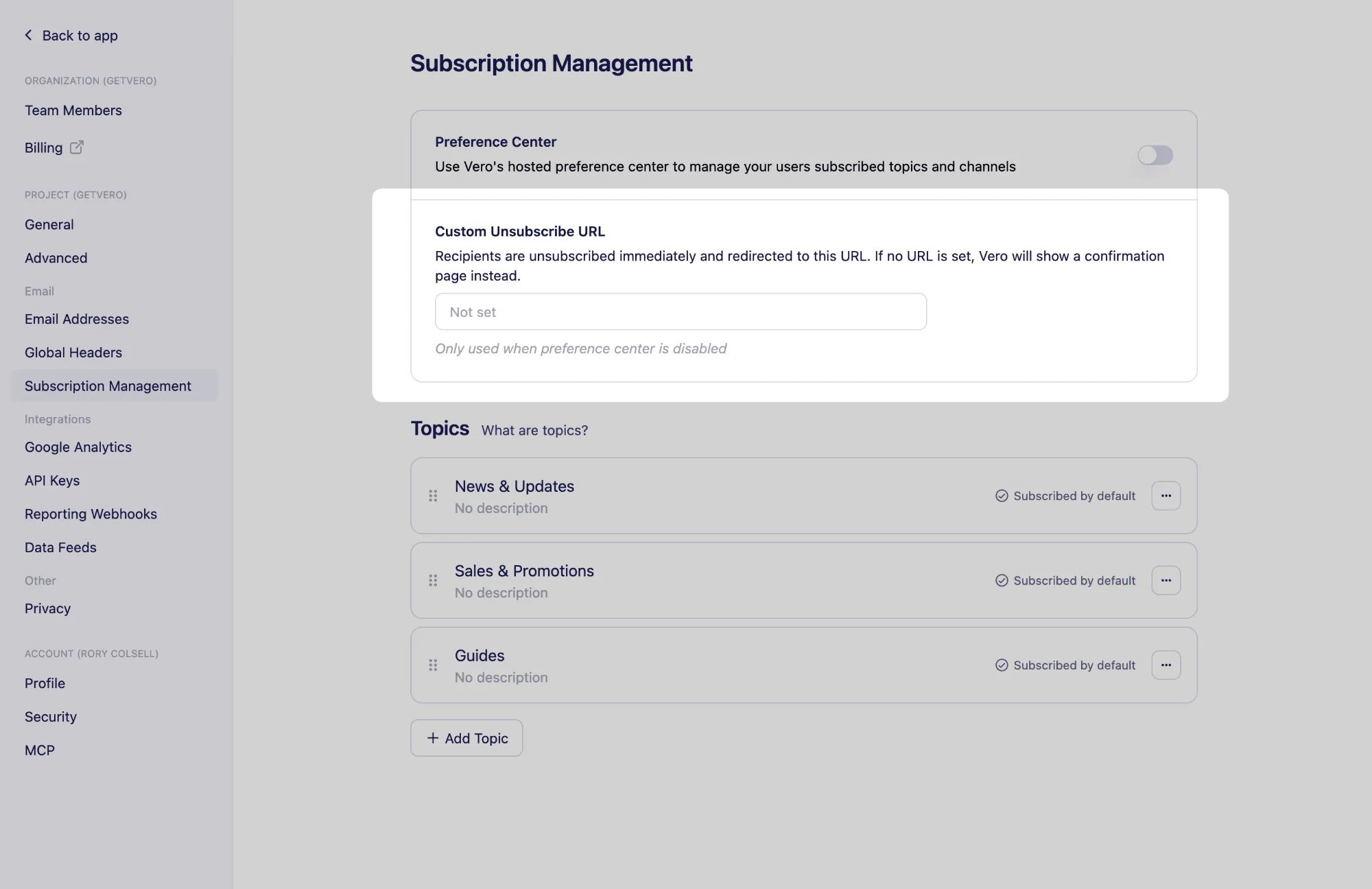 3. Enter the full URL of your page, for example `https://example.com/unsubscribe-confirm`.
4. Click **Save**.
Users are still unsubscribed as soon as they click the link. The redirect happens afterwards, so your page does not need to unsubscribe them.
To go back to Vero's confirmation page, clear the URL and click **Save**.
The custom page is only used while the preference center is turned off. With the preference center on, Vero hosts the unsubscribe pages so users can change their topics or resubscribe without leaving the page. See [Setting up a preference center](/vero-2/subscriptions/setting-up-a-preference-center).
## Next steps
* [Subscriptions overview](/vero-2/subscriptions/subscriptions-overview)
* [Setting up a preference center](/vero-2/subscriptions/setting-up-a-preference-center)
## Need Help?
If you have any questions, reach out to us at [support@getvero.com](mailto:support@getvero.com).
3. Enter the full URL of your page, for example `https://example.com/unsubscribe-confirm`.
4. Click **Save**.
Users are still unsubscribed as soon as they click the link. The redirect happens afterwards, so your page does not need to unsubscribe them.
To go back to Vero's confirmation page, clear the URL and click **Save**.
The custom page is only used while the preference center is turned off. With the preference center on, Vero hosts the unsubscribe pages so users can change their topics or resubscribe without leaving the page. See [Setting up a preference center](/vero-2/subscriptions/setting-up-a-preference-center).
## Next steps
* [Subscriptions overview](/vero-2/subscriptions/subscriptions-overview)
* [Setting up a preference center](/vero-2/subscriptions/setting-up-a-preference-center)
## Need Help?
If you have any questions, reach out to us at [support@getvero.com](mailto:support@getvero.com).