> ## Documentation Index
> Fetch the complete documentation index at: https://help.getvero.com/llms.txt
> Use this file to discover all available pages before exploring further.
# Setting up a preference center
> Turn on Vero's hosted preference center and link to it from your emails so users can choose which topics they receive.
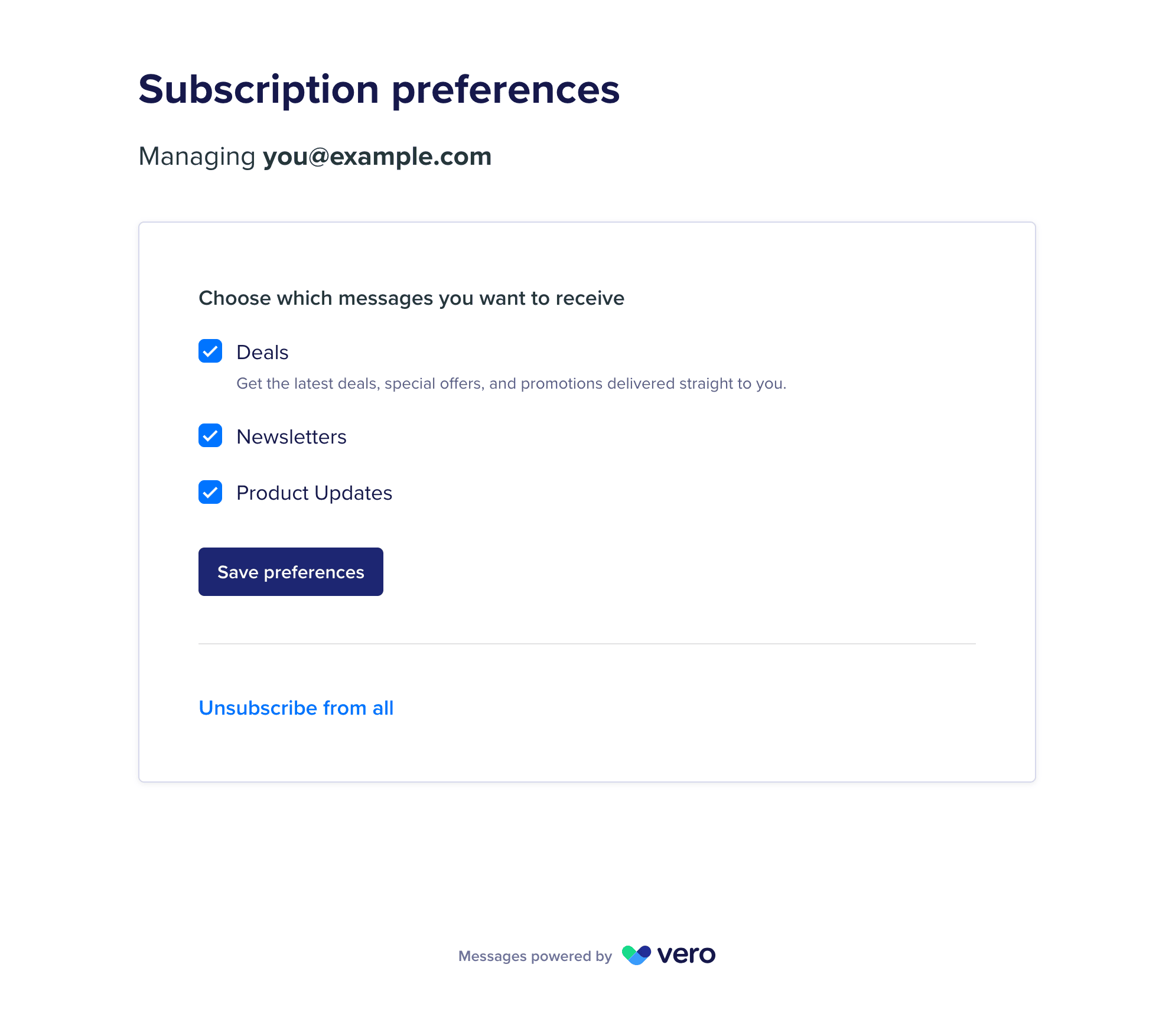
The preference center is a page hosted by Vero where users choose which [subscription topics](/vero-2/subscriptions/subscriptions-overview#topic-subscriptions) they receive, unsubscribe from everything, or resubscribe.
 ## Prerequisites
1. **Preference center access on your project** – [contact us](mailto:support@getvero.com) to have it turned on. Once it is, a **Preference Center** switch and a **Topics** section appear under **Settings** → **Subscription Management**.
2. **Edit access to your project** – anyone who can edit your project can turn on the preference center. **Member (View only)** users can see the page but not change it. See [Set up team access](/vero-2/account-settings/setting-up-team-access-in-vero-connect).
## Step 1: Turn on the preference center
1. Go to **Settings** → **Subscription Management**.
2. Turn on the **Preference Center** switch.
## Prerequisites
1. **Preference center access on your project** – [contact us](mailto:support@getvero.com) to have it turned on. Once it is, a **Preference Center** switch and a **Topics** section appear under **Settings** → **Subscription Management**.
2. **Edit access to your project** – anyone who can edit your project can turn on the preference center. **Member (View only)** users can see the page but not change it. See [Set up team access](/vero-2/account-settings/setting-up-team-access-in-vero-connect).
## Step 1: Turn on the preference center
1. Go to **Settings** → **Subscription Management**.
2. Turn on the **Preference Center** switch.
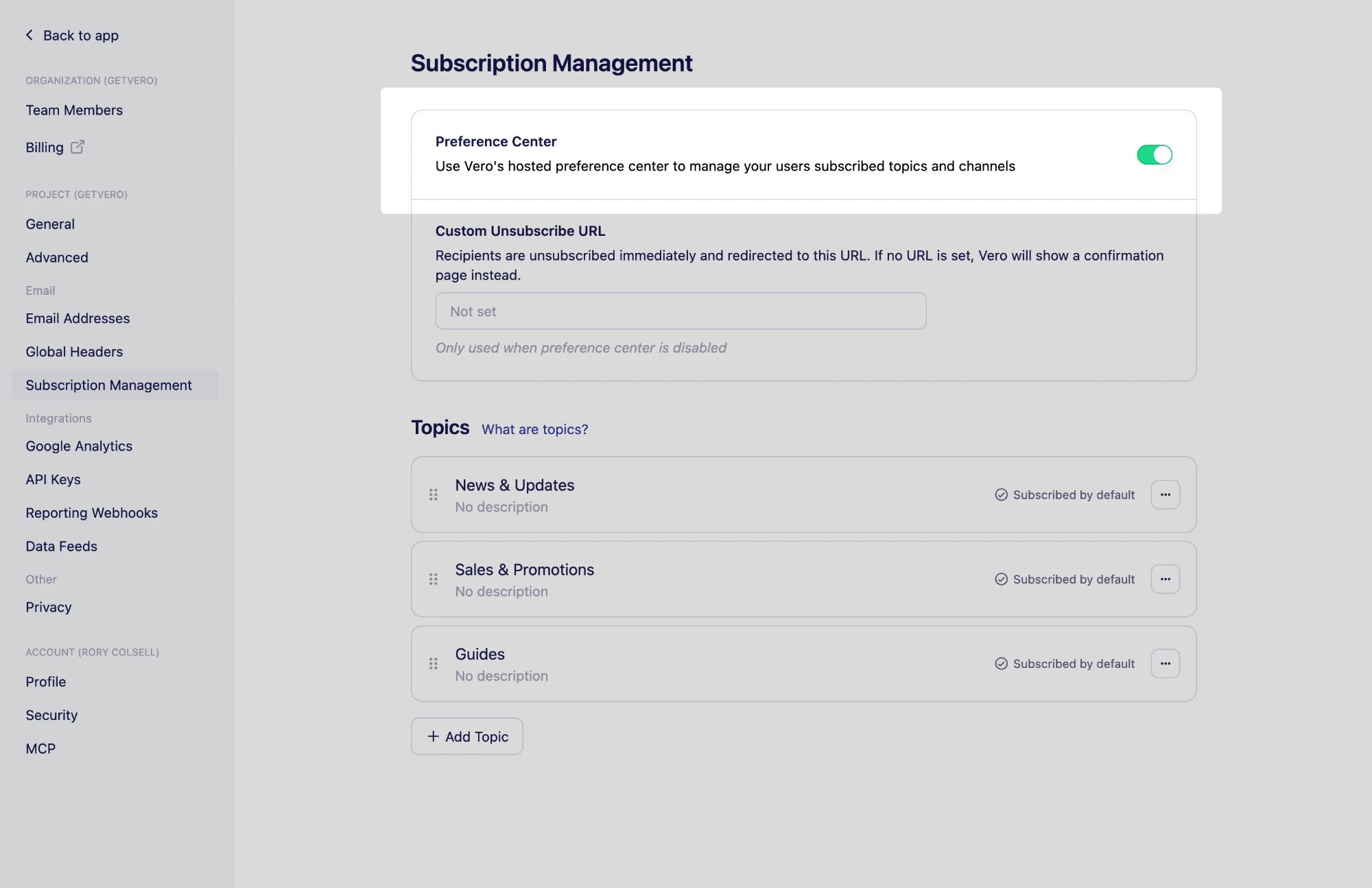 While the preference center is on, your [custom unsubscribe page](/vero-2/subscriptions/custom-unsubscribe-page) is not used. Vero hosts the unsubscribe pages instead, so users can change their topics or resubscribe without leaving the page.
## Step 2: Create your topics
The preference center lists your project's topics, in the order set under **Settings** → **Subscription Management**. Create at least one before you link to the page. See [Using topics](/vero-2/subscriptions/using-topics).
## Step 3: Add a preference link to your emails
Add one of these Liquid tags to your email content:
* `{{url.manage_preferences_link}}` inserts a URL to the preference center, personalized for each recipient.
* `{{url.manage_preferences}}` inserts a link reading *Manage preferences* that points to the same URL.
A typical footer offers both the preference center and a full unsubscribe:
```html theme={null}
While the preference center is on, your [custom unsubscribe page](/vero-2/subscriptions/custom-unsubscribe-page) is not used. Vero hosts the unsubscribe pages instead, so users can change their topics or resubscribe without leaving the page.
## Step 2: Create your topics
The preference center lists your project's topics, in the order set under **Settings** → **Subscription Management**. Create at least one before you link to the page. See [Using topics](/vero-2/subscriptions/using-topics).
## Step 3: Add a preference link to your emails
Add one of these Liquid tags to your email content:
* `{{url.manage_preferences_link}}` inserts a URL to the preference center, personalized for each recipient.
* `{{url.manage_preferences}}` inserts a link reading *Manage preferences* that points to the same URL.
A typical footer offers both the preference center and a full unsubscribe:
```html theme={null}
Manage your preferences or
unsubscribe from all emails.
```
`{{url.unsubscribe_link}}` and `{{url.unsubscribe}}` keep working and still unsubscribe a user from your project entirely. See [Personalize content with Liquid](/vero-2/message-content/how-to-personalise-your-message-using-liquid) for the full list of tags.
## Step 4: Test the link
Send yourself a preview email that includes the link, then click it to check your topics appear as expected. The link opens a preview of the preference center, marked as a preview, and you need to be signed in to your Vero account to view it.
## Troubleshooting
### There is no Preference Center switch
**Possible causes:** Preference center access has not been turned on for your project.
**Solution:** [Contact us](mailto:support@getvero.com) to have it turned on, then reload **Settings** → **Subscription Management**.
### The Preference Center switch is disabled
**Possible causes:** Your role is **Member (View only)**.
**Solution:** Ask a project owner to change your role.
### The preference center has no topics to choose from
**Possible causes:** The project has no topics yet.
**Solution:** Create a topic under **Settings** → **Subscription Management**, then reload the page.
## Next steps
* [Using topics](/vero-2/subscriptions/using-topics)
* [Subscriptions overview](/vero-2/subscriptions/subscriptions-overview)
## Need Help?
If you have any questions, reach out to us at [support@getvero.com](mailto:support@getvero.com).