

john@yourdomain.com, SPF, DKIM and DMARC are the methods by which Gmail, Outlook and other email providers confirm you’re allowed to send from yourdomain.com.
How Vero configures SPF and DKIM
When you add a custom domain to Vero you will see two DNS records. Take the screenshot below.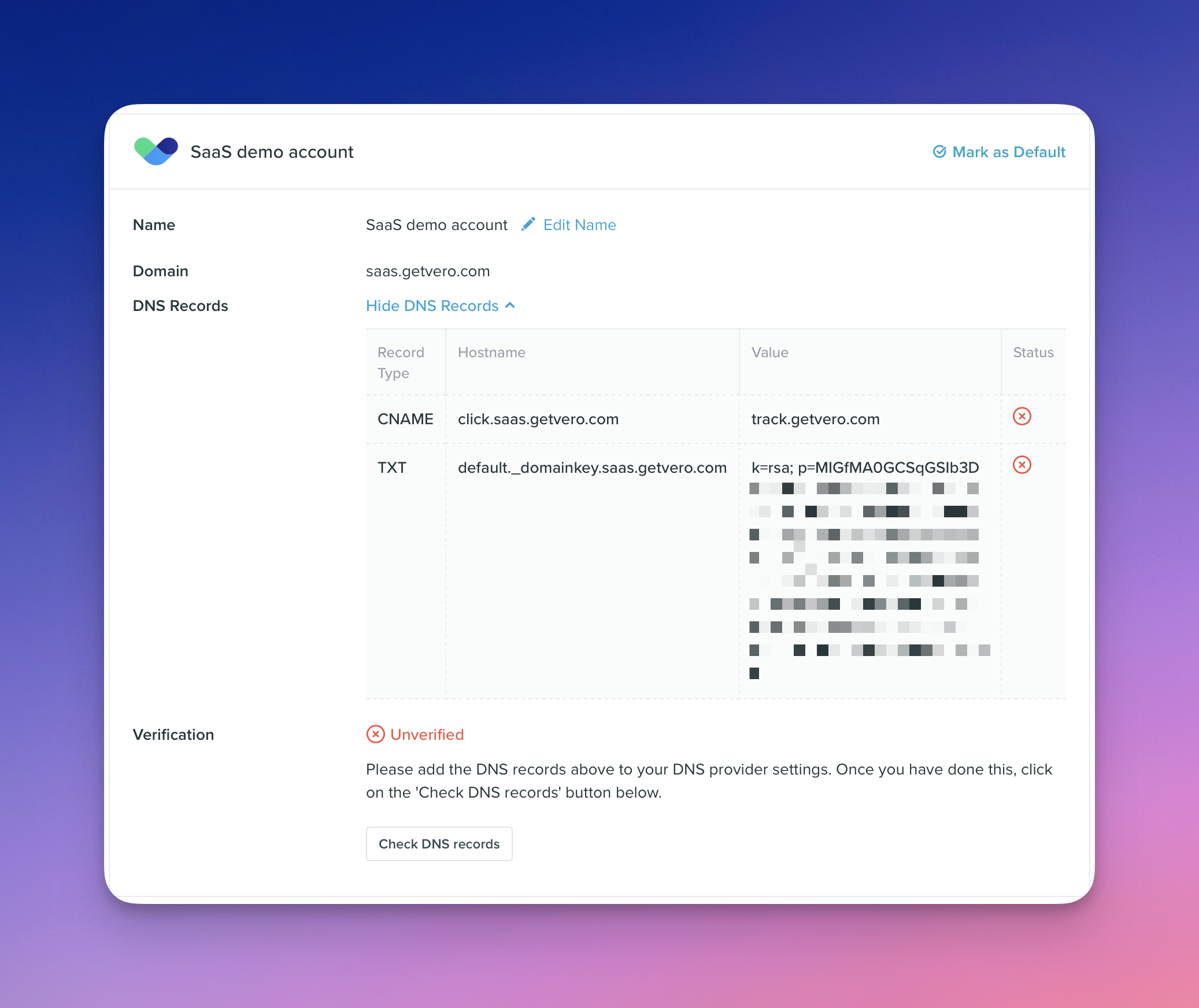
DKIM verification
When you add theTXT record for default._domainkey.saas.getvero.com, you’re proving that you own the domain in question. In this case we’re proving we own saas.getvero.com.
Here’s the process in practice:
- Vero generates a private key (kept securely on our side) and a corresponding public key. The public key is published as the
p=part of thedefault._domainkey.saas.getvero.comDNS value. - When Vero sends an email, we attach a DKIM-Signature header:
d=is set to the sending domain (saas.getvero.com).s=points to the DNS selector (default). This is how Gmail, etc. know to finddefault._domainkey.saas.getvero.com.b=contains a signature. This is a hash we generate and then encrypt using the secret private key.
- The receiving mail server:
- Recalculates the hash of the email headers/body.
- Fetches the public key from
default._domainkey.saas.getvero.com. - Uses the public key in the DNS record to decrypt the value in
b=. It compares this with the recalculated hash (mentioned in #1 above).
- If the hashes match then DKIM succeeeds, i.e.
DKIM = pass.
SPF verification
SPF works slightly differently:- Your domain’s SPF record declares which mail servers are allowed to send on your behalf.
- When Vero sends an email, the
Return-Pathis set to a Vero-controlled email and domain. In our example above this will be something likeHASH@track.getvero.com. - Recipient servers, like Gmail, will use the
Return-Pathto look up the domaintrack.getvero.comand relevant SPF records.
- When Vero sends an email, the
- The receiving server checks the sending IP against that
Return-Pathdomain’s SPF record.- SPF records can be “chained”. You’ll notice
track.getvero.comdelegates SPF records to various domains and IPs.
- SPF records can be “chained”. You’ll notice
DMARC checks and reporting
SPF checks : Does theReturn-Path domain authorize the sending IP?
DKIM checks : Does the email carry a valid signature? Was it sent by a server who has access to the secure private key.
DMARC ties SPF and DKIM together. It checks for alignment : do either SPF or DKIM “line up” with the visible From address? It asks: “Take the results of SPF and DKIM, and make sure that at least one passesand matches the visible From domain.”
Let’s say we’d sent an email from info@saas.getvero.com, DMARC checks that at least one of SPF or DKIM passed and also that the from address info@saas.getvero.com actually matches the SPF or DKIM values.
You might ask why this is important? The reason is:
- SPF checks use domain in the
Return-Pathvalue. - DKIM checks use the domain specified in the DKIM header.
info@yourdomain.com. For clarity, imagine this email:
mailer-service.com. They’d be valid.
And, yet, neither of those match ceo@yourdomain.com.
That’s what DMARC solves. It checks that either the domain in Return-Path or the d= DKIM header align with ceo@yourdomain.com.
After checking, DMARC then enforces your policy:
p=none→ just monitor.p=quarantine→ send suspicious mail to spam.p=reject→ reject suspicious mail outright.
Bringing it all together
- SPF checks the envelope sender (
Return-Path). - DKIM checks a cryptographic signature against your DNS.
- DMARC ensures at least one of SPF or DKIM both passes and matches your From domain, and lets you choose what to do if they don’t.
What email headers look like
Using Gmail’s “View Original”, here’s a snippet of some headers from a real email sent by Vero. This email is one of our own emails (we use Vero of course).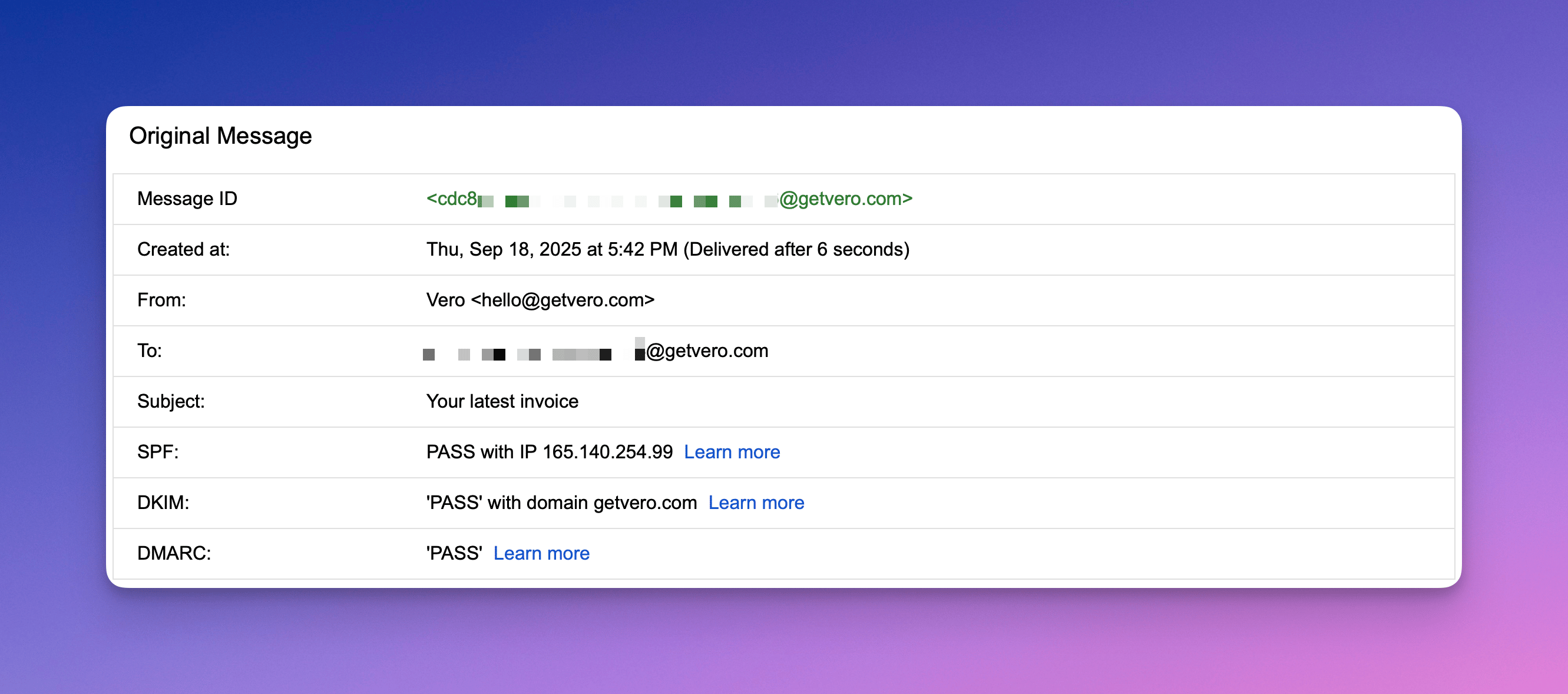
A and PTR records (less common)
Most customers will never need to configure A or PTR records — Vero manages these by default. However, in some cases we may ask you to create them when you’re sending from your own branded domain using Vero’s infrastructure. Here’s what they are and why they matter:What an A record does
An A (Address) record maps your sending hostname (likemail.yourdomain.com) to a specific IP address — in this case, one of Vero’s sending IPs.
It ensures that when mail providers look up your domain, it resolves to the same IP address used to send messages.
Example:
What a PTR record does
A PTR (Pointer) record does the reverse — it maps an IP address back to a domain name. This is known as reverse DNS (rDNS). Example:Why Vero sometimes asks you to set these up
Even though your emails are being sent from Vero’s infrastructure, we may ask you to add A/PTR records to make the sending IP and domain appear as if they belong to your own brand. This is useful when:- You’re sending from a custom subdomain (like
mail.yourdomain.com). - You are paying for dedicated IP’s.
- You want the sending IP’s reverse DNS (PTR) to match your domain.
- You’re establishing dedicated sending reputation for your domain.
198.51.100.12, we may ask you to create:
- An A record :
mail.yourdomain.com → 198.51.100.12 - A PTR record :
198.51.100.12 → mail.yourdomain.com
- Mail servers see consistent, aligned DNS data (A ↔ PTR match).
- Your “From” domain, DKIM, and envelope sender align with network identity.
- You build a strong domain reputation that reflects your brand, not Vero’s shared infrastructure.
Summary
✅ In short: A and PTR records help make your sending domain and IP appear as one — strengthening your reputation and improving deliverability.