Send campaign emails to additional recipients using CC and BCC addresses, including dynamic Liquid values.
Add CC and BCC recipients to emails sent from campaigns and Journey email steps.
CC (carbon copy) — sends a copy to additional recipients. All recipients, including those in the To field, can see who was CC’d.
BCC (blind carbon copy) — sends a copy to additional recipients, but BCC’d addresses are hidden from everyone else on the thread.
Because CC addresses are visible to every recipient, avoid using CC for internal addresses (such as a sales rep or account manager) when sending to end customers. Use BCC instead to keep those addresses private.
Both fields are free-form inputs — they accept any static email address, comma-separated list of addresses, or Liquid expression.
Open a campaign or Journey email step in the editor.
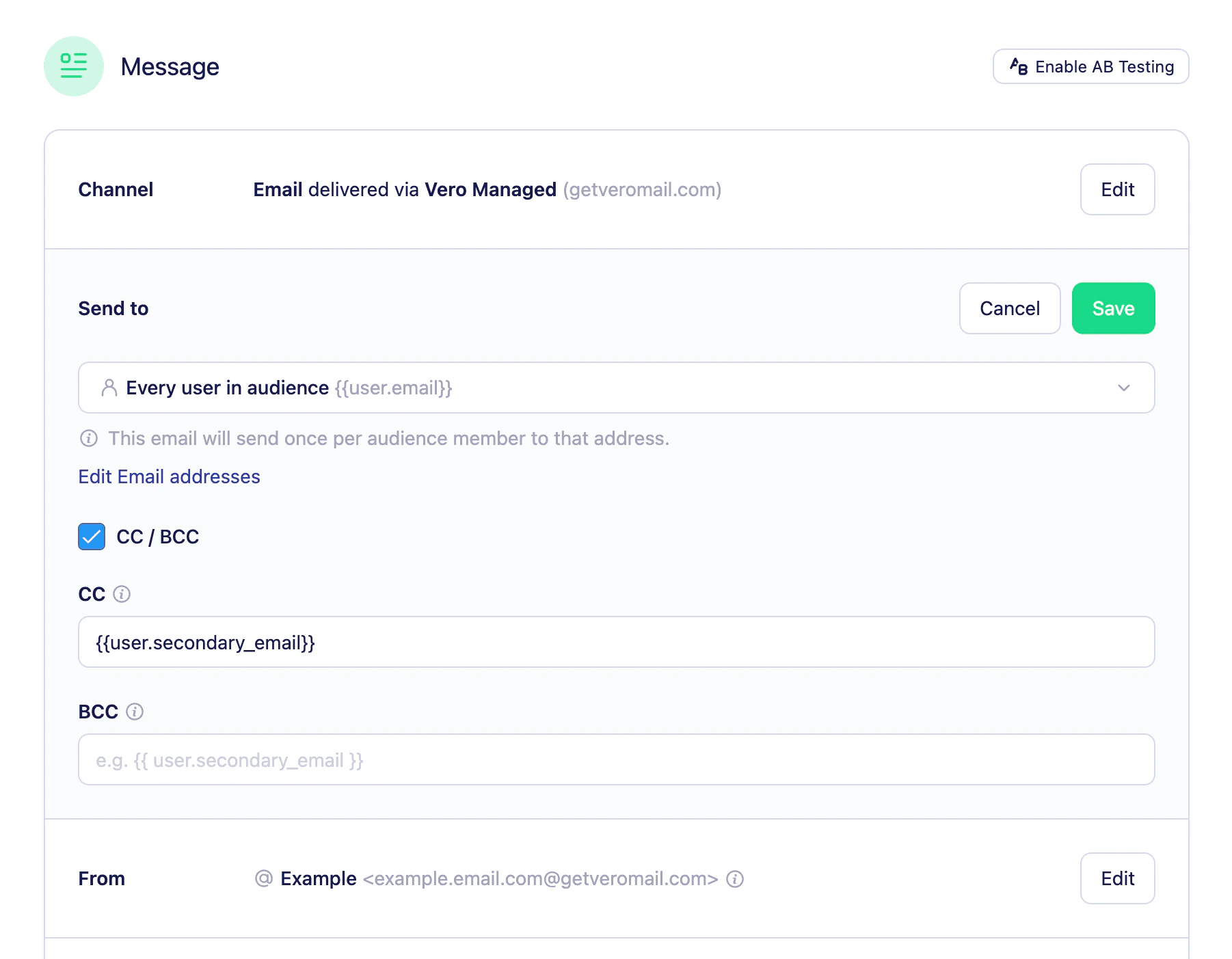
In the To section, check Include CC/BCC. The panel expands to reveal two inputs — CC and BCC.
Enter one or more email addresses in either field. Separate multiple addresses with a comma.
You can use Liquid in CC and BCC fields to set recipients dynamically. For example, {{user.manager_email}} will resolve to the value stored on each user’s profile.
Click Save to apply your changes.
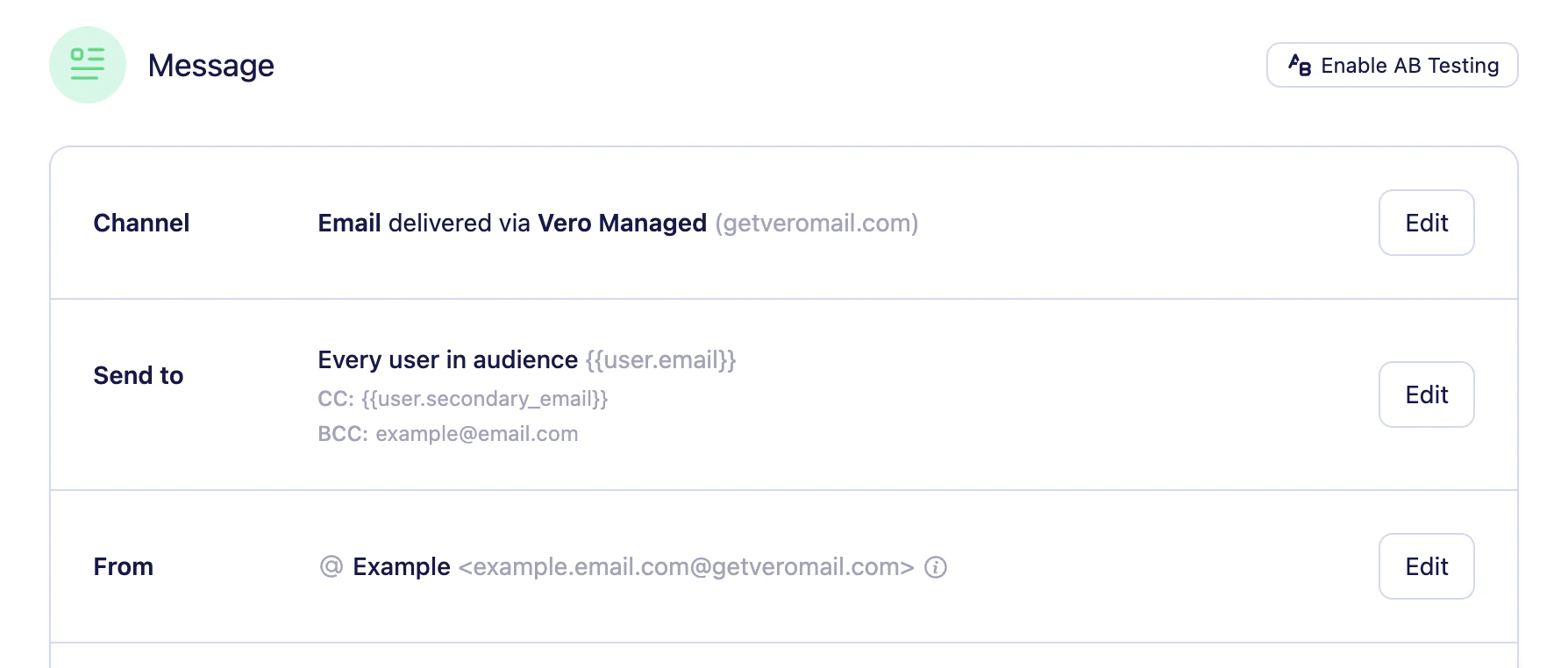
The panel expands automatically when you open a campaign or email step that already has CC or BCC values set. Unchecking Include CC/BCC clears both fields.
{"docsConfig":{"theme":"aspen","$schema":"https://mintlify.com/docs.json","name":"Vero Help Documentation","colors":{"primary":"#2297F4","light":"#2297F4","dark":"#2297F4"},"logo":{"light":"https://mintcdn.com/vero-c561507b/GrQPezX4qIgpUopY/logo/light-docs.png?fit=max\u0026auto=format\u0026n=GrQPezX4qIgpUopY\u0026q=85\u0026s=0dfaea4bc1ba0ea928b9944304d30dbc","dark":"https://mintcdn.com/vero-c561507b/GrQPezX4qIgpUopY/logo/dark-docs.png?fit=max\u0026auto=format\u0026n=GrQPezX4qIgpUopY\u0026q=85\u0026s=89dd094c9774bc930b920676f0bc5e9a"},"favicon":"https://mintcdn.com/vero-c561507b/GQzTWHH2pJ4tem7d/assets/favicon.ico?fit=max\u0026auto=format\u0026n=GQzTWHH2pJ4tem7d\u0026q=85\u0026s=b61d481596e0b30335c62850b9ca49a8","api":{"playground":{"display":"simple"}},"navbar":{"links":[{"href":"mailto:support@getvero.comm","label":"Contact Support ↗"},{"href":"https://connect.getvero.com","label":"Login ↗"}],"primary":{"type":"button","label":"Get Started","href":"https://getvero.com/get-started"}},"footer":{"socials":{"github":"https://github.com/getvero","linkedin":"https://linkedin.com/company/getvero"}},"seo":{"metatags":{"canonical":"https://help.getvero.com"}},"fonts":{"family":"Inter"},"contextual":{"options":["copy","view","chatgpt","claude","perplexity","mcp","cursor","vscode"],"display":"header"},"styling":{"latex":false},"navigation":{"pages":[]}},"deployment":{"deploymentMetadataValue":{"subdomain":"vero-c561507b","hasAudioNarration":false,"actualSubdomain":"vero-c561507b","customDomains":["help.getvero.com"],"gitSource":{"type":"github","owner":"getvero","repo":"mint-docs","deployBranch":"main","contentDirectory":"","isPrivate":true,"mountPath":"","label":""},"chroma":{"liveDeploymentHistoryId":"6ae18cb1e627477c53f7758c","collectionId":"db358afd-613e-4516-9e50-51e202d730bd","schemaVersion":"v3","latestBuiltDeploymentHistoryId":"6ae18cb1e627477c53f7758c"},"feedback":{"thumbs":true},"entitlements":{"AI_CHAT":{"status":"ENABLED"},"WEB_MCP":{"status":"ENABLED"},"NARRATION":{"status":"ENABLED"}},"buildId":"6ae18d12878fcf8de97b7624","clientVersion":"0.0.4054","searchFilterCounts":[{"language":"default","tag":"Vero 1.0","count":114},{"language":"default","tag":"Vero 2.0","count":88},{"language":"default","tag":"API reference","count":39},{"language":"default","tag":"Campaigns API","count":31},{"language":"default","tag":"Campaigns","count":26},{"language":"default","tag":"Broadcasts","count":15},{"language":"default","tag":"Segments","count":14},{"language":"default","tag":"Account, Billing \u0026 Team","count":13},{"language":"default","tag":"Integrations","count":12},{"language":"default","tag":"Customers","count":11}]},"assistantConfig":{"enableAskAiButton":false,"enableStarterQuestions":false,"enableAskAiSearchBar":true,"deflection":{"enabled":true,"email":"support@getvero.com","showHelpButton":true}},"basePath":"","hasChatPermissions":true,"hasWebMcpPermissions":true,"toggles":[{"name":"kill-isr","enabled":true,"variant":{"name":"disabled","enabled":false,"feature_enabled":true},"impressionData":false},{"name":"agent-mintlify-slack","enabled":true,"variant":{"name":"disabled","enabled":false,"feature_enabled":true},"impressionData":false},{"name":"agent-integrations-settings","enabled":true,"variant":{"name":"disabled","enabled":false,"feature_enabled":true},"impressionData":false},{"name":"automations-pr-grouping","enabled":true,"variant":{"name":"disabled","enabled":false,"feature_enabled":true},"impressionData":false},{"name":"custom-prefix","enabled":true,"variant":{"name":"disabled","enabled":false,"feature_enabled":true},"impressionData":false},{"name":"analytics-v7","enabled":true,"variant":{"name":"disabled","enabled":false,"feature_enabled":true},"impressionData":false},{"name":"user-flows-analytics","enabled":true,"variant":{"name":"disabled","enabled":false,"feature_enabled":true},"impressionData":false},{"name":"no-publish-flow","enabled":true,"variant":{"name":"disabled","enabled":false,"feature_enabled":true},"impressionData":false},{"name":"workos-onboarding","enabled":true,"variant":{"name":"disabled","enabled":false,"feature_enabled":true},"impressionData":false},{"name":"llms-txt-v2","enabled":true,"variant":{"name":"disabled","enabled":false,"feature_enabled":true},"impressionData":false},{"name":"snapshot-serving-live","enabled":true,"variant":{"name":"disabled","enabled":false,"feature_enabled":true},"impressionData":false},{"name":"stripTemperatureMiddleware","enabled":true,"variant":{"name":"disabled","enabled":false,"feature_enabled":true},"impressionData":false},{"name":"support-platform-pylon-zendesk","enabled":true,"variant":{"name":"disabled","enabled":false,"feature_enabled":true},"impressionData":false},{"name":"snapshot-serving","enabled":true,"variant":{"name":"disabled","enabled":false,"feature_enabled":true},"impressionData":false},{"name":"instant-rollback","enabled":true,"variant":{"name":"disabled","enabled":false,"feature_enabled":true},"impressionData":false},{"name":"granular-notifications-server","enabled":true,"variant":{"name":"disabled","enabled":false,"feature_enabled":true},"impressionData":false},{"name":"granular-notifications","enabled":true,"variant":{"name":"disabled","enabled":false,"feature_enabled":true},"impressionData":false},{"name":"automations-fable","enabled":true,"variant":{"name":"disabled","enabled":false,"feature_enabled":true},"impressionData":false},{"name":"fixed-ai-action-pricing","enabled":true,"variant":{"name":"disabled","enabled":false,"feature_enabled":true},"impressionData":false},{"name":"automation-resolve-merge-conflict","enabled":true,"variant":{"name":"disabled","enabled":false,"feature_enabled":true},"impressionData":false},{"name":"scoped-publishing","enabled":true,"variant":{"name":"disabled","enabled":false,"feature_enabled":true},"impressionData":false},{"name":"mintql","enabled":true,"variant":{"name":"disabled","enabled":false,"feature_enabled":true},"impressionData":false},{"name":"page-level-analytics","enabled":true,"variant":{"name":"disabled","enabled":false,"feature_enabled":true},"impressionData":false},{"name":"editor-version-history-v2","enabled":true,"variant":{"name":"disabled","enabled":false,"feature_enabled":true},"impressionData":false},{"name":"billing-page-v2","enabled":true,"variant":{"name":"disabled","enabled":false,"feature_enabled":true},"impressionData":false},{"name":"full-page-search","enabled":true,"variant":{"name":"disabled","enabled":false,"feature_enabled":true},"impressionData":false},{"name":"workspace-projects","enabled":true,"variant":{"name":"disabled","enabled":false,"feature_enabled":true},"impressionData":false},{"name":"assistant-v5","enabled":true,"variant":{"name":"disabled","enabled":false,"feature_enabled":true},"impressionData":false},{"name":"byok-sep-25","enabled":true,"variant":{"name":"disabled","enabled":false,"feature_enabled":true},"impressionData":false},{"name":"fork-pr-previews","enabled":true,"variant":{"name":"disabled","enabled":false,"feature_enabled":true},"impressionData":false},{"name":"revalidation-jwt","enabled":true,"variant":{"name":"disabled","enabled":false,"feature_enabled":true},"impressionData":false},{"name":"vite-origin","enabled":true,"variant":{"name":"disabled","enabled":false,"feature_enabled":true},"impressionData":false},{"name":"billing-updated-9-15","enabled":true,"variant":{"name":"disabled","enabled":false,"feature_enabled":true},"impressionData":false},{"name":"workos-sso-scim","enabled":true,"variant":{"name":"disabled","enabled":false,"feature_enabled":true},"impressionData":false},{"name":"hobby-abuse-scan","enabled":true,"variant":{"name":"disabled","enabled":false,"feature_enabled":true},"impressionData":false},{"name":"dashboard-inbox","enabled":true,"variant":{"name":"disabled","enabled":false,"feature_enabled":true},"impressionData":false},{"name":"workos-signup","enabled":true,"variant":{"name":"disabled","enabled":false,"feature_enabled":true},"impressionData":false},{"name":"turbopuffer-dual-write","enabled":true,"variant":{"name":"disabled","enabled":false,"feature_enabled":true},"impressionData":false},{"name":"workos-enabled","enabled":true,"variant":{"name":"disabled","enabled":false,"feature_enabled":true},"impressionData":false},{"name":"approve-review-flow","enabled":true,"variant":{"name":"disabled","enabled":false,"feature_enabled":true},"impressionData":false},{"name":"sso-setup-deadline-banner","enabled":true,"variant":{"name":"disabled","enabled":false,"feature_enabled":true},"impressionData":false},{"name":"rbac-expansion","enabled":true,"variant":{"name":"disabled","enabled":false,"feature_enabled":true},"impressionData":false}],"googleFontsInlined":false},"customCss":[{"filePath":"style.css","content":"#sidebar{width:300px}.nav-logo{height:30px}picture>img{border:1px solid #eee;border-radius:15px}"}],"page":{"pagePath":"vero-2/campaigns/cc-and-bcc","slug":"/vero-2/campaigns/cc-and-bcc","pageMetadata":{"title":"CC and BCC addresses","description":"Send campaign emails to additional recipients using CC and BCC addresses, including dynamic Liquid values.","keywords":["cc","bcc","carbon copy","blind carbon copy","email recipients","cc address","bcc address","liquid email","dynamic recipients","campaign email","journey email"],"href":"/vero-2/campaigns/cc-and-bcc"},"description":{"compiledSource":"\"use strict\";\nconst {jsx: _jsx} = arguments[0];\nconst {useMDXComponents: _provideComponents} = arguments[0];\nfunction _createMdxContent(props) {\n const _components = {\n p: \"p\",\n ..._provideComponents(),\n ...props.components\n };\n return _jsx(_components.p, {\n children: \"Send campaign emails to additional recipients using CC and BCC addresses, including dynamic Liquid values.\"\n });\n}\nfunction MDXContent(props = {}) {\n const {wrapper: MDXLayout} = {\n ..._provideComponents(),\n ...props.components\n };\n return MDXLayout ? _jsx(MDXLayout, {\n ...props,\n children: _jsx(_createMdxContent, {\n ...props\n })\n }) : _createMdxContent(props);\n}\nreturn {\n default: MDXContent\n};\n","frontmatter":{},"scope":{}},"pageType":"default","mdx":{"mdxSource":{"compiledSource":"\"use strict\";const{Fragment:_Fragment,jsx:_jsx,jsxs:_jsxs}=arguments[0];const{useMDXComponents:_provideComponents}=arguments[0];function _createMdxContent(props){const _components={a:`a`,code:`code`,li:`li`,ol:`ol`,p:`p`,strong:`strong`,ul:`ul`,..._provideComponents(),...props.components},{Heading,OptimizedImage,Tip,Warning}=_components;if(!Heading)_missingMdxReference(`Heading`,true);if(!OptimizedImage)_missingMdxReference(`OptimizedImage`,true);if(!Tip)_missingMdxReference(`Tip`,true);if(!Warning)_missingMdxReference(`Warning`,true);return _jsxs(_Fragment,{children:[_jsx(_components.p,{children:`Add CC and BCC recipients to emails sent from campaigns and Journey email steps.`}),`\n`,_jsxs(_components.ul,{children:[`\n`,_jsxs(_components.li,{children:[_jsx(_components.strong,{children:`CC`}),` (carbon copy) — sends a copy to additional recipients. All recipients, including those in the To field, can see who was CC’d.`]}),`\n`,_jsxs(_components.li,{children:[_jsx(_components.strong,{children:`BCC`}),` (blind carbon copy) — sends a copy to additional recipients, but BCC’d addresses are hidden from everyone else on the thread.`]}),`\n`]}),`\n`,_jsx(Warning,{children:`Because CC addresses are visible to every recipient, avoid using CC for internal addresses (such as a sales rep or account manager) when sending to end customers. Use BCC instead to keep those addresses private.`}),`\n`,_jsx(_components.p,{children:`Both fields are free-form inputs — they accept any static email address, comma-separated list of addresses, or Liquid expression.`}),`\n`,_jsx(Heading,{level:`2`,id:`adding-cc-and-bcc-addresses`,children:`Adding CC and BCC addresses`}),`\n`,_jsxs(_components.ol,{children:[`\n`,_jsx(_components.li,{children:`Open a campaign or Journey email step in the editor.`}),`\n`,_jsxs(_components.li,{children:[`In the `,_jsx(_components.strong,{children:`To`}),` section, check `,_jsx(_components.strong,{children:`Include CC/BCC`}),`. The panel expands to reveal two inputs — `,_jsx(_components.strong,{children:`CC`}),` and `,_jsx(_components.strong,{children:`BCC`}),`.`]}),`\n`,_jsx(_components.li,{children:`Enter one or more email addresses in either field. Separate multiple addresses with a comma.`}),`\n`]}),`\n`,_jsx(OptimizedImage,{src:`https://mintcdn.com/vero-c561507b/Aw3Tz97FWfcDRCo9/images/vero-2/cc.png?fit=max\u0026auto=format\u0026n=Aw3Tz97FWfcDRCo9\u0026q=85\u0026s=41ee08df9a5ef8cc3615e2c7acbdd977`,alt:`The Include CC/BCC panel expanded, showing CC and BCC inputs`,\"data-og-width\":`1802`,width:`1802`,\"data-og-height\":`1403`,height:`1403`,\"data-path\":`images/vero-2/cc.png`,\"data-optimize\":`true`,\"data-opv\":`3`,srcset:`https://mintcdn.com/vero-c561507b/Aw3Tz97FWfcDRCo9/images/vero-2/cc.png?w=280\u0026fit=max\u0026auto=format\u0026n=Aw3Tz97FWfcDRCo9\u0026q=85\u0026s=d5cc6ff8b89fb7fbab79ced773a909eb 280w, https://mintcdn.com/vero-c561507b/Aw3Tz97FWfcDRCo9/images/vero-2/cc.png?w=560\u0026fit=max\u0026auto=format\u0026n=Aw3Tz97FWfcDRCo9\u0026q=85\u0026s=66c3592417b549f70fc768ec7246706b 560w, https://mintcdn.com/vero-c561507b/Aw3Tz97FWfcDRCo9/images/vero-2/cc.png?w=840\u0026fit=max\u0026auto=format\u0026n=Aw3Tz97FWfcDRCo9\u0026q=85\u0026s=f699956f37c59725f0fdc8839ed96116 840w, https://mintcdn.com/vero-c561507b/Aw3Tz97FWfcDRCo9/images/vero-2/cc.png?w=1100\u0026fit=max\u0026auto=format\u0026n=Aw3Tz97FWfcDRCo9\u0026q=85\u0026s=40155cba2764c96278edf2d05646c57d 1100w, https://mintcdn.com/vero-c561507b/Aw3Tz97FWfcDRCo9/images/vero-2/cc.png?w=1650\u0026fit=max\u0026auto=format\u0026n=Aw3Tz97FWfcDRCo9\u0026q=85\u0026s=2d69b8727074c48958c98428584e161f 1650w, https://mintcdn.com/vero-c561507b/Aw3Tz97FWfcDRCo9/images/vero-2/cc.png?w=2500\u0026fit=max\u0026auto=format\u0026n=Aw3Tz97FWfcDRCo9\u0026q=85\u0026s=cd8bb28ba865c16a947e94ee60baeccd 2500w`}),`\n`,_jsxs(Tip,{children:[`You can use Liquid in CC and BCC fields to set recipients dynamically. For example, `,_jsx(_components.code,{children:`{{user.manager_email}}`}),` will resolve to the value stored on each user’s profile.`]}),`\n`,_jsxs(_components.ol,{start:`4`,children:[`\n`,_jsxs(_components.li,{children:[`Click `,_jsx(_components.strong,{children:`Save`}),` to apply your changes.`]}),`\n`]}),`\n`,_jsxs(_components.p,{children:[`The panel expands automatically when you open a campaign or email step that already has CC or BCC values set. Unchecking `,_jsx(_components.strong,{children:`Include CC/BCC`}),` clears both fields.`]}),`\n`,_jsx(Heading,{level:`2`,id:`reviewing-cc-and-bcc-in-the-summary-view`,children:`Reviewing CC and BCC in the summary view`}),`\n`,_jsx(_components.p,{children:`When CC or BCC addresses are set, they appear as labelled rows in the read-only campaign summary.`}),`\n`,_jsx(OptimizedImage,{src:`https://mintcdn.com/vero-c561507b/Aw3Tz97FWfcDRCo9/images/vero-2/cc-preview.png?fit=max\u0026auto=format\u0026n=Aw3Tz97FWfcDRCo9\u0026q=85\u0026s=3fc8dd6934dc5f7c300f3d206b887269`,alt:`Campaign summary view showing CC and BCC rows`,\"data-og-width\":`1788`,width:`1788`,\"data-og-height\":`762`,height:`762`,\"data-path\":`images/vero-2/cc-preview.png`,\"data-optimize\":`true`,\"data-opv\":`3`,srcset:`https://mintcdn.com/vero-c561507b/Aw3Tz97FWfcDRCo9/images/vero-2/cc-preview.png?w=280\u0026fit=max\u0026auto=format\u0026n=Aw3Tz97FWfcDRCo9\u0026q=85\u0026s=73f5d1657fbeaa5022c3464a7140b6b4 280w, https://mintcdn.com/vero-c561507b/Aw3Tz97FWfcDRCo9/images/vero-2/cc-preview.png?w=560\u0026fit=max\u0026auto=format\u0026n=Aw3Tz97FWfcDRCo9\u0026q=85\u0026s=d04142ff3ca7bbf368af68c0a30e71ed 560w, https://mintcdn.com/vero-c561507b/Aw3Tz97FWfcDRCo9/images/vero-2/cc-preview.png?w=840\u0026fit=max\u0026auto=format\u0026n=Aw3Tz97FWfcDRCo9\u0026q=85\u0026s=408f502ad0ca4d0abe4727f4f1dca284 840w, https://mintcdn.com/vero-c561507b/Aw3Tz97FWfcDRCo9/images/vero-2/cc-preview.png?w=1100\u0026fit=max\u0026auto=format\u0026n=Aw3Tz97FWfcDRCo9\u0026q=85\u0026s=2e8a94720e4221747f24731e563e95a3 1100w, https://mintcdn.com/vero-c561507b/Aw3Tz97FWfcDRCo9/images/vero-2/cc-preview.png?w=1650\u0026fit=max\u0026auto=format\u0026n=Aw3Tz97FWfcDRCo9\u0026q=85\u0026s=abbaf69ff498bc7a2c6fde23adf7272d 1650w, https://mintcdn.com/vero-c561507b/Aw3Tz97FWfcDRCo9/images/vero-2/cc-preview.png?w=2500\u0026fit=max\u0026auto=format\u0026n=Aw3Tz97FWfcDRCo9\u0026q=85\u0026s=39b4cc431618b1a4b642c20b78c63641 2500w`}),`\n`,_jsx(Heading,{level:`2`,id:`need-help`,children:`Need Help?`}),`\n`,_jsxs(_components.p,{children:[`If you have any questions, reach out to us at `,_jsx(_components.a,{href:`mailto:support@getvero.com`,children:`support@getvero.com`}),`.`]})]})}function MDXContent(props={}){const{wrapper:MDXLayout}={..._provideComponents(),...props.components};return MDXLayout?_jsx(MDXLayout,{...props,children:_jsx(_createMdxContent,{...props})}):_createMdxContent(props)}return{default:MDXContent};function _missingMdxReference(id,component){throw new Error(`Expected `+(component?`component`:`object`)+\" `\"+id+\"` to be defined: you likely forgot to import, pass, or provide it.\")}","frontmatter":{},"scope":{"config":{},"pageMetadata":{"title":"CC and BCC addresses","description":"Send campaign emails to additional recipients using CC and BCC addresses, including dynamic Liquid values.","keywords":["cc","bcc","carbon copy","blind carbon copy","email recipients","cc address","bcc address","liquid email","dynamic recipients","campaign email","journey email"],"href":"/vero-2/campaigns/cc-and-bcc"}}},"mdxSourceWithNoJs":null},"mdxExtracts":{"tableOfContents":[{"title":"Adding CC and BCC addresses","slug":"adding-cc-and-bcc-addresses","depth":2,"children":[]},{"title":"Reviewing CC and BCC in the summary view","slug":"reviewing-cc-and-bcc-in-the-summary-view","depth":2,"children":[]},{"title":"Need Help?","slug":"need-help","depth":2,"children":[]}],"codeExamples":{}},"jsLinks":[],"subdomain":"vero-c561507b","siteName":"Vero Help Documentation","title":"CC and BCC addresses - Vero Help Documentation","navMaps":{"firstHrefInVersion":{},"firstHrefInLanguage":{}},"lastModified":"2026-05-26T10:36:41.264Z","originalFileLocation":"vero-2/campaigns/cc-and-bcc.mdx"},"headHtml":"\u003cscript data-mint-head>(function(){var d=document.documentElement,p=null;if(!p){try{p=localStorage.getItem(\"isDarkMode\")}catch(e){}if(p==='true')p='dark';else if(p==='false')p='light';if(p!=='light'\u0026\u0026p!=='dark'\u0026\u0026p!=='system')p=\"system\"}var r=p==='system'?(matchMedia(\"(prefers-color-scheme: dark)\").matches?'dark':'light'):p;d.classList.remove(r==='dark'?'light':'dark');d.classList.add(r);d.setAttribute(\"data-theme-preference\",p)})();\u003c/script>\u003cmeta data-mint-head name=\"description\" content=\"Send campaign emails to additional recipients using CC and BCC addresses, including dynamic Liquid values.\">\u003cmeta data-mint-head name=\"application-name\" content=\"Vero Help Documentation\">\u003cmeta data-mint-head name=\"generator\" content=\"Mintlify\">\u003clink data-mint-head rel=\"icon\" type=\"image/png\" sizes=\"192x192\" href=\"/mintlify-assets/_mintlify/favicons/vero-c561507b/F7u1dwoZquGZtMgr/_generated/favicon/android-chrome-192x192.png\" media=\"(prefers-color-scheme: light)\">\u003clink data-mint-head rel=\"apple-touch-icon\" type=\"image/png\" sizes=\"180x180\" href=\"/mintlify-assets/_mintlify/favicons/vero-c561507b/F7u1dwoZquGZtMgr/_generated/favicon/apple-touch-icon.png\">\u003clink data-mint-head rel=\"icon\" type=\"image/png\" sizes=\"16x16\" href=\"/mintlify-assets/_mintlify/favicons/vero-c561507b/F7u1dwoZquGZtMgr/_generated/favicon/favicon-16x16.png\" media=\"(prefers-color-scheme: light)\">\u003clink data-mint-head rel=\"icon\" type=\"image/png\" sizes=\"32x32\" href=\"/mintlify-assets/_mintlify/favicons/vero-c561507b/F7u1dwoZquGZtMgr/_generated/favicon/favicon-32x32.png\" media=\"(prefers-color-scheme: light)\">\u003clink data-mint-head rel=\"shortcut icon\" type=\"image/x-icon\" href=\"/mintlify-assets/_mintlify/favicons/vero-c561507b/F7u1dwoZquGZtMgr/_generated/favicon/favicon.ico\" media=\"(prefers-color-scheme: light)\">\u003clink data-mint-head rel=\"icon\" type=\"image/png\" sizes=\"192x192\" href=\"/mintlify-assets/_mintlify/favicons/vero-c561507b/F7u1dwoZquGZtMgr/_generated/favicon-dark/android-chrome-192x192.png\" media=\"(prefers-color-scheme: dark)\">\u003clink data-mint-head rel=\"icon\" type=\"image/png\" sizes=\"16x16\" href=\"/mintlify-assets/_mintlify/favicons/vero-c561507b/F7u1dwoZquGZtMgr/_generated/favicon-dark/favicon-16x16.png\" media=\"(prefers-color-scheme: dark)\">\u003clink data-mint-head rel=\"icon\" type=\"image/png\" sizes=\"32x32\" href=\"/mintlify-assets/_mintlify/favicons/vero-c561507b/F7u1dwoZquGZtMgr/_generated/favicon-dark/favicon-32x32.png\" media=\"(prefers-color-scheme: dark)\">\u003clink data-mint-head rel=\"shortcut icon\" type=\"image/x-icon\" href=\"/mintlify-assets/_mintlify/favicons/vero-c561507b/F7u1dwoZquGZtMgr/_generated/favicon-dark/favicon.ico\" media=\"(prefers-color-scheme: dark)\">\u003cmeta data-mint-head property=\"og:title\" content=\"CC and BCC addresses - Vero Help Documentation\">\u003cmeta data-mint-head property=\"og:description\" content=\"Send campaign emails to additional recipients using CC and BCC addresses, including dynamic Liquid values.\">\u003cmeta data-mint-head property=\"og:site_name\" content=\"Vero Help Documentation\">\u003cmeta data-mint-head property=\"og:url\" content=\"https://help.getvero.com/vero-2/campaigns/cc-and-bcc\">\u003cmeta data-mint-head property=\"og:type\" content=\"website\">\u003cmeta data-mint-head property=\"og:image\" content=\"https://vero-c561507b.mintlify.app/_mintlify/api/og/v2?division=Campaigns\u0026amp;title=CC+and+BCC+addresses\u0026amp;description=Send+campaign+emails+to+additional+recipients+using+CC+and+BCC+addresses%2C+including+dynamic+Liquid+values.\u0026amp;theme=5ed00c546d73e344fd173388\u0026amp;signature=351087e727ef0fc139a494b7f164e2ed45057dbc4358f1e37a51dcfa81a40fd0\">\u003cmeta data-mint-head property=\"og:image:width\" content=\"1200\">\u003cmeta data-mint-head property=\"og:image:height\" content=\"630\">\u003cmeta data-mint-head name=\"twitter:card\" content=\"summary_large_image\">\u003cmeta data-mint-head name=\"twitter:title\" content=\"CC and BCC addresses - Vero Help Documentation\">\u003cmeta data-mint-head name=\"twitter:description\" content=\"Send campaign emails to additional recipients using CC and BCC addresses, including dynamic Liquid values.\">\u003cmeta data-mint-head name=\"twitter:image\" content=\"https://vero-c561507b.mintlify.app/_mintlify/api/og/v2?division=Campaigns\u0026amp;title=CC+and+BCC+addresses\u0026amp;description=Send+campaign+emails+to+additional+recipients+using+CC+and+BCC+addresses%2C+including+dynamic+Liquid+values.\u0026amp;theme=5ed00c546d73e344fd173388\u0026amp;signature=351087e727ef0fc139a494b7f164e2ed45057dbc4358f1e37a51dcfa81a40fd0\">\u003cmeta data-mint-head name=\"twitter:image:width\" content=\"1200\">\u003cmeta data-mint-head name=\"twitter:image:height\" content=\"630\">\u003cmeta data-mint-head name=\"msapplication-config\" content=\"/mintlify-assets/_mintlify/favicons/vero-c561507b/F7u1dwoZquGZtMgr/_generated/favicon/browserconfig.xml\">\u003cmeta data-mint-head name=\"apple-mobile-web-app-title\" content=\"Vero Help Documentation\">\u003cmeta data-mint-head name=\"msapplication-TileColor\" content=\"#2297F4\">\u003clink data-mint-head rel=\"canonical\" href=\"https://help.getvero.com/vero-2/campaigns/cc-and-bcc\">\u003clink data-mint-head rel=\"alternate\" type=\"application/xml\" href=\"/sitemap.xml\">\u003clink data-mint-head rel=\"alternate\" type=\"text/markdown\" href=\"/vero-2/campaigns/cc-and-bcc.md\">\u003cscript data-mint-head type=\"application/ld+json\">{\"@context\":\"https://schema.org\",\"@graph\":[{\"@type\":\"Organization\",\"@id\":\"https://help.getvero.com/#organization\",\"name\":\"Vero Help Documentation\",\"url\":\"https://help.getvero.com\",\"logo\":{\"@type\":\"ImageObject\",\"url\":\"https://mintcdn.com/vero-c561507b/GrQPezX4qIgpUopY/logo/light-docs.png?fit=max\u0026auto=format\u0026n=GrQPezX4qIgpUopY\u0026q=85\u0026s=0dfaea4bc1ba0ea928b9944304d30dbc\"}},{\"@type\":\"WebSite\",\"@id\":\"https://help.getvero.com#website\",\"name\":\"Vero Help Documentation\",\"url\":\"https://help.getvero.com\",\"publisher\":{\"@id\":\"https://help.getvero.com/#organization\"}},{\"@type\":\"WebPage\",\"@id\":\"https://help.getvero.com/vero-2/campaigns/cc-and-bcc#webpage\",\"url\":\"https://help.getvero.com/vero-2/campaigns/cc-and-bcc\",\"name\":\"CC and BCC addresses\",\"description\":\"Send campaign emails to additional recipients using CC and BCC addresses, including dynamic Liquid values.\",\"dateModified\":\"2026-05-26T10:36:41.264Z\",\"isPartOf\":{\"@id\":\"https://help.getvero.com#website\"},\"breadcrumb\":{\"@id\":\"https://help.getvero.com/vero-2/campaigns/cc-and-bcc#breadcrumb\"}},{\"@type\":\"BreadcrumbList\",\"@id\":\"https://help.getvero.com/vero-2/campaigns/cc-and-bcc#breadcrumb\",\"itemListElement\":[{\"@type\":\"ListItem\",\"position\":1,\"name\":\"Campaigns\",\"item\":\"https://help.getvero.com/vero-2/campaigns/overview\"},{\"@type\":\"ListItem\",\"position\":2,\"name\":\"CC and BCC addresses\",\"item\":\"https://help.getvero.com/vero-2/campaigns/cc-and-bcc\"}]},{\"@type\":[\"Article\",\"TechArticle\"],\"@id\":\"https://help.getvero.com/vero-2/campaigns/cc-and-bcc#article\",\"headline\":\"CC and BCC addresses\",\"name\":\"CC and BCC addresses\",\"description\":\"Send campaign emails to additional recipients using CC and BCC addresses, including dynamic Liquid values.\",\"url\":\"https://help.getvero.com/vero-2/campaigns/cc-and-bcc\",\"mainEntityOfPage\":{\"@id\":\"https://help.getvero.com/vero-2/campaigns/cc-and-bcc#webpage\"},\"dateModified\":\"2026-05-26T10:36:41.264Z\",\"keywords\":\"cc, bcc, carbon copy, blind carbon copy, email recipients, cc address, bcc address, liquid email, dynamic recipients, campaign email, journey email\",\"publisher\":{\"@id\":\"https://help.getvero.com/#organization\"},\"isPartOf\":{\"@id\":\"https://help.getvero.com#website\"}}]}\u003c/script>\u003cscript data-mint-head type=\"application/ld+json\">{\"@context\":\"https://schema.org\",\"@type\":\"WebSite\",\"name\":\"Vero Help Documentation\",\"creator\":{\"@type\":\"Organization\",\"name\":\"Mintlify\",\"url\":\"https://mintlify.com\"}}\u003c/script>","siteName":"Vero Help Documentation","nav":{"global":null,"tabs":[{"tab":"Vero 1.0","pages":[{"title":"Vero 1.0","href":""}]},{"tab":"Vero 2.0","pages":[{"title":"Vero 2.0 Documentation","sidebarTitle":"Overview","href":"/vero-2/introduction"},{"group":"Getting Started","pages":[{"title":"Core Concepts","href":"/vero-2/getting-started/core-concepts"},{"title":"Switching to Vero 2.0","href":"/vero-2/getting-started/switching-from-vero-1"},{"title":"Quickstart Guide","href":"/vero-2/getting-started/quickstart"}]},{"group":"Campaigns","pages":[{"title":"Campaigns Overview","href":"/vero-2/campaigns/overview"},{"group":"Broadcasts","expanded":true,"pages":[{"title":"Create a broadcast","href":"/vero-2/campaigns/broadcasts/create-a-broadcast"},{"title":"Add an audience","href":"/vero-2/campaigns/broadcasts/adding-an-audience-to-your-campaign"},{"group":"Audience Types","pages":[{"title":"Segment Audience","href":"/vero-2/campaigns/broadcasts/using-a-segment-to-define-your-campaign-audience"},{"title":"Ad-hoc Segment Audience","href":"/vero-2/campaigns/broadcasts/using-an-ad-hoc-segment-to-define-your-campaign-audience"},{"title":"CSV Audience","href":"/vero-2/campaigns/broadcasts/using-a-csv-to-create-your-audience"},{"title":"SQL Audience","href":"/vero-2/campaigns/broadcasts/using-a-sql-data-source-to-create-your-audience"},{"title":"Google Sheet audience","href":"/vero-2/campaigns/broadcasts/using-google-sheets-to-create-your-audience"}]},{"title":"Send or schedule a broadcast","href":"/vero-2/campaigns/broadcasts/send-or-schedule-a-broadcast"},{"title":"Send in user's timezone","href":"/vero-2/campaigns/broadcasts/send-in-users-timezone"},{"title":"Recurring schedules","href":"/vero-2/campaigns/broadcasts/recurring-schedule-trigger-automation"},{"title":"AB Testing a broadcast","href":"/vero-2/campaigns/broadcasts/ab-testing-single-message"}]},{"group":"Journeys","expanded":true,"pages":[{"title":"Creating and editing a Journey","href":"/vero-2/campaigns/journeys/creating-and-editing-journeys"},{"title":"Event triggers","href":"/vero-2/campaigns/journeys/event-trigger"},{"title":"Email node","href":"/vero-2/campaigns/journeys/email-node"},{"title":"Delay node","href":"/vero-2/campaigns/journeys/delay-node"},{"title":"SMS node","href":"/vero-2/campaigns/journeys/sms-node"},{"title":"Push node","href":"/vero-2/campaigns/journeys/push-node"},{"title":"True/False node","href":"/vero-2/campaigns/journeys/true-false-node"},{"title":"Exit node","href":"/vero-2/campaigns/journeys/exit-node"},{"title":"Scoping event conditions by property","href":"/vero-2/campaigns/journeys/scope-conditions"}]},{"title":"Conversion goals","href":"/vero-2/campaigns/conversion-tracking"},{"title":"Campaign reports","description":"Track sent, delivered, opened, clicked, and unsubscribed metrics with detailed reports and daily breakdowns.","href":"/vero-2/reporting/viewing-campaign-metrics"},{"title":"CC and BCC addresses","href":"/vero-2/campaigns/cc-and-bcc"},{"title":"Manage 'from' \u0026 'to' addresses","description":"Add and configure reusable email addresses for use as the From or To address in campaign and Journey emails.","href":"/vero-2/campaigns/setting-up-your-from-email-address"},{"title":"Custom email headers","href":"/vero-2/campaigns/setting-up-a-custom-header-on-your-campaign"}]},{"group":"Message Content","pages":[{"title":"Email content","href":"/vero-2/message-content/creating-an-email-message"},{"title":"SMS content","href":"/vero-2/message-content/creating-an-sms-message"},{"title":"Push content","href":"/vero-2/message-content/creating-a-push-message"},{"title":"Personalize content with Liquid","href":"/vero-2/message-content/how-to-personalise-your-message-using-liquid"},{"title":"Multi-language content","href":"/vero-2/message-content/languages"},{"title":"Email attachments","href":"/vero-2/message-content/email-attachments"}]},{"group":"Templates","pages":[{"title":"Create and use a template","href":"/vero-2/templates/how-to-create-and-use-a-template"}]},{"group":"User Profiles","pages":[{"title":"User Profiles overview","href":"/vero-2/user-profiles/understanding-user-profiles"},{"title":"Identity stitching and resolution","href":"/vero-2/user-profiles/identity-stitching-and-resolution"},{"title":"Add or update user profiles","href":"/vero-2/user-profiles/how-to-add-or-update-user-profiles"},{"title":"Manually edit user profile data","href":"/vero-2/user-profiles/how-to-edit-user-profiles"},{"title":"Unsubscribe a user","href":"/vero-2/user-profiles/how-unsubscribes-are-managed-in-vero-2"},{"title":"Managing suppressions per user profile","href":"/vero-2/user-profiles/managing-suppressions"}]},{"group":"Events","pages":[{"title":"Events overview","href":"/vero-2/events/events-overview"},{"title":"Setting up event tracking","href":"/vero-2/events/setting-up-event-tracking"}]},{"group":"Segments","pages":[{"title":"Segments overview","href":"/vero-2/segments/what-are-segments"},{"title":"Creating and editing segments","href":"/vero-2/segments/creating-and-editing-segments"},{"title":"Managing Segments","href":"/vero-2/segments/managing-segments"},{"title":"Segment Conditions","href":"/vero-2/segments/segment-conditions"},{"title":"System segments","href":"/vero-2/segments/system-segments"},{"title":"Deleting users in a segment","href":"/vero-2/segments/deleting-users-in-a-segment"},{"title":"Using Segments in a campaign","href":"/vero-2/segments/using-segments-in-a-campaign"}]},{"group":"Data Sources","pages":[{"title":"Data Sources overview","href":"/vero-2/data-sources/data-sources-overview"},{"title":"Snowflake","href":"/vero-2/data-sources/how-to-connect-to-snowflake"},{"title":"Redshift","href":"/vero-2/data-sources/how-to-connect-to-redshift"},{"title":"Google BigQuery","href":"/vero-2/data-sources/how-to-connect-to-google-bigquery"},{"title":"PostgreSQL","href":"/vero-2/data-sources/how-to-connect-to-postgresql"},{"title":"Microsoft SQL Server","href":"/vero-2/data-sources/how-to-connect-to-microsoft-sql-server"},{"title":"MySQL","href":"/vero-2/data-sources/how-to-connect-to-mysql"},{"title":"IP addresses for whitelisting","href":"/vero-2/data-sources/ip-addresses-to-whitelist"}]},{"group":"Data Destinations","pages":[{"title":"Data Destination overview","href":"/vero-2/data-destinations/exporting-to-data-destination"},{"title":"Google BigQuery","href":"/vero-2/data-destinations/how-to-export-data-to-google-bigquery"},{"title":"Snowflake","href":"/vero-2/data-destinations/snowflake"}]},{"group":"Channels","pages":[{"title":"Channels overview","href":"/vero-2/channels/channels-overview"},{"group":"Channel types","expanded":true,"pages":[{"title":"Email channels","sidebarTitle":"Email","href":"/vero-2/channels/email/how-to-configure-the-email-channel"},{"title":"SMS channel","sidebarTitle":"SMS","href":"/vero-2/channels/sms/how-to-configure-the-sms-channel"},{"title":"Push channel","sidebarTitle":"Push","href":"/vero-2/channels/push/how-to-configure-a-push-channel"}]},{"title":"Mobile push integration guide","href":"/vero-2/channels/push/push-integration-guide"},{"title":"SMS phone number format","sidebarTitle":"Phone number format","href":"/vero-2/channels/sms/phone-number-format"},{"title":"SMS Quiet Hours Compliance","href":"/vero-2/channels/sms/sms-quiet-hours-compliance"},{"title":"AWS SNS IAM access policy","href":"/vero-2/channels/push/aws-sns-iam-access-policy"}]},{"group":"Reporting \u0026 Activity","pages":[{"title":"Campaign reports","href":"/vero-2/reporting/viewing-campaign-metrics"},{"title":"Real vs. bot engagement","href":"/vero-2/reporting/real-and-bot-engagement"},{"title":"Activity logs","href":"/vero-2/reporting/understanding-entries-in-the-activity-log"}]},{"group":"Importing \u0026 Exporting","pages":[{"title":"Imports overview","href":"/vero-2/importing-exporting/imports-overview"},{"title":"Import user profiles via CSV","href":"/vero-2/importing-exporting/import-user-profiles-via-csv"},{"title":"Import events via CSV","href":"/vero-2/importing-exporting/import-events-via-csv"},{"title":"Unsubscribe users via CSV","href":"/vero-2/importing-exporting/unsubscribe-users-via-csv"},{"title":"CSV import FAQs","href":"/vero-2/importing-exporting/csv-import-faqs"},{"title":"Exports overview","href":"/vero-2/importing-exporting/exports-overview"},{"title":"Exporting one user's activity logs","href":"/vero-2/importing-exporting/exporting-activity-from-a-profile"},{"title":"Exporting a list of profiles","href":"/vero-2/importing-exporting/exporting-profiles"}]},{"group":"Account \u0026 Settings","pages":[{"title":"Project send modes","href":"/vero-2/account-settings/project-send-modes"},{"title":"Project Timezone","href":"/vero-2/account-settings/setting-the-timezone-on-your-account"},{"title":"Invite team members","href":"/vero-2/account-settings/setting-up-team-access-in-vero-connect"},{"title":"Two-Factor Authentication (2FA)","href":"/vero-2/account-settings/security/two-factor-authentication"},{"title":"Google sign-in","href":"/vero-2/account-settings/security/using-google-to-sign-in-to-vero-connect"}]},{"group":"Integrations","pages":[{"title":"Personalize with Data Feeds","href":"/vero-2/message-content/data-feeds"},{"title":"Setting up Webhooks","href":"/vero-2/integrations/setting-up-reporting-webhooks"}]}]},{"tab":"AI","pages":[{"title":"AI","href":"/vero-ai/overview"}]},{"tab":"Developer Guide","pages":[{"title":"Developer Guide","href":"/developer-docs/overview"}]},{"tab":"API reference","pages":[{"title":"API reference","href":"/api-reference/overview"}]}]},"basePath":"","title":"CC and BCC addresses - Vero Help Documentation","buildId":"dpl_345ReqzYaAjzS9QpeJemsKdb7KDj","deploymentId":"dpl_345ReqzYaAjzS9QpeJemsKdb7KDj","dynamics":["a74be98ba7"],"chunks":["zoom-image-lightbox-B4-wUcHm.js","lightbox-handle-r17bVUz3.js"]}